This time we’re going bigger than ever. Fabric, Power BI, SQL, AI and more. We're covering it all. You won't want to miss it.
Learn moreDid you hear? There's a new SQL AI Developer certification (DP-800). Start preparing now and be one of the first to get certified. Register now
Hello Developer Community,
We've created a customer facing product using Power BI embedded. We have also created a tool to automate the uploading of our Power BI reports using the Power BI RESTful API. Prior to uploading a report update, we delete the existing report (if exists) then upload the update as shown below..
String reportId = GetReportID(report.reportName, report.groupId, client);
if (reportId != null)
{
client.Reports.DeleteReportInGroup(report.groupId,reportId.ToString());
}
We have seen that the data sets from previous versions of the report stay behind and they are auto-refreshing these causes our Azure SQL Server DTU’s to be constantly in use. We have about 20 reports and we are constantly uploading updates, therefore the number of datasets being left behind are increasing. You can see our datasets being duplicated every time we upload a new report.
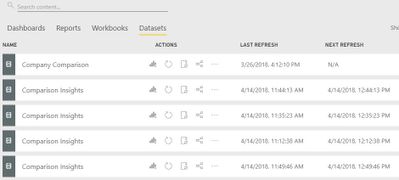
My question is (and it may have an obvious answer, If so, apologize in advance) , should we manually delete the dataset first, then delete the report every time we update a report using the RESTful API?
If so, is something like the below code something we need to add prior to the client.Reports.DeleteReportInGroup(..) method??
var dsId = GetDatasetID(report.reportName, report.groupId, client);
client.Datasets.DeleteDatasetById(dsId.ToString());
I've also seen posts recommending to upload once, then change the report to point to the dataset on the Service.
I'm not sure how is best to proceed.
Thank you all in advance.
Emilio
Solved! Go to Solution.
How you upload the updated report here?
There is no delete DataSet API available under Power BI Embedded, based on the documentation:
https://msdn.microsoft.com/en-us/library/mt203551.aspx
If here you are uploading report from PBIX file, then you could take use of the import API to overwrite the existing dataset:
Check the Import API below:
If the dataset is well configured for data refreshing, then you could rebind the report to the Old DataSet through the Rebind report API:
https://msdn.microsoft.com/en-us/library/mt784672.aspx
Regards,
Michael
How you upload the updated report here?
There is no delete DataSet API available under Power BI Embedded, based on the documentation:
https://msdn.microsoft.com/en-us/library/mt203551.aspx
If here you are uploading report from PBIX file, then you could take use of the import API to overwrite the existing dataset:
Check the Import API below:
If the dataset is well configured for data refreshing, then you could rebind the report to the Old DataSet through the Rebind report API:
https://msdn.microsoft.com/en-us/library/mt784672.aspx
Regards,
Michael
Check out the April 2026 Power BI update to learn about new features.
If you have recently started exploring Fabric, we'd love to hear how it's going. Your feedback can help with product improvements.
| User | Count |
|---|---|
| 4 | |
| 2 | |
| 1 | |
| 1 | |
| 1 |