This time we’re going bigger than ever. Fabric, Power BI, SQL, AI and more. We're covering it all. You won't want to miss it.
Learn moreLevel up your Power BI skills this month - build one visual each week and tell better stories with data! Get started
Hi Community,
I have an Informix database and i wanna use direct query mode with this.
Basically this is not avaliable but i found a solve.
This solve is custom connector in a third hand party.
Now the direct query run well on the desktop version but after shareing can not load the modell on the web.
I have datagateway wich is working but the custom connector do not work.
Has somebody any idea what's wrong?
Thanks.
Solved! Go to Solution.
Hi @dlmsbi
There are some limitations around custom connector with data gateway. Please check it. It might help you.
https://docs.microsoft.com/en-us/power-bi/connect-data/service-gateway-custom-connectors
Thanks
Hari
Thanks Hariharan,
I was read earlier that but did not helped.
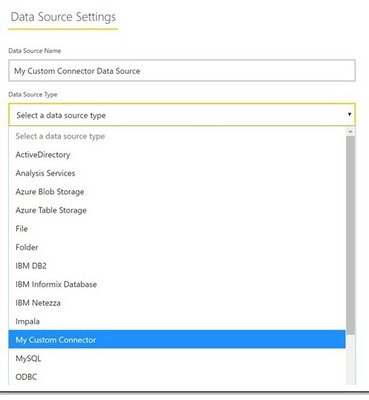
The prolem is when i set it the gateway i have no the upper input field.
Wich mean i can not select the custom connector like here:
Hi @dlmsbi
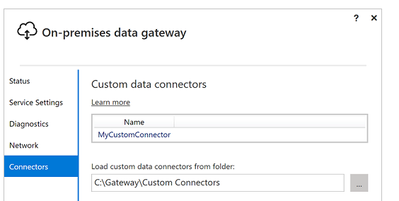
You need add your custom connector file in the C:\Gateway\Custom Connectors folder. Please try this is not helps then you can raise a support ticket to Power BI team.
Thanks
Hari
Hi @dlmsbi
There are some limitations around custom connector with data gateway. Please check it. It might help you.
https://docs.microsoft.com/en-us/power-bi/connect-data/service-gateway-custom-connectors
Thanks
Hari
Check out the April 2026 Power BI update to learn about new features.
Sign up to receive a private message when registration opens and key events begin.
If you have recently started exploring Fabric, we'd love to hear how it's going. Your feedback can help with product improvements.
| User | Count |
|---|---|
| 4 | |
| 2 | |
| 2 | |
| 1 | |
| 1 |