Join us at FabCon Atlanta from March 16 - 20, 2026, for the ultimate Fabric, Power BI, AI and SQL community-led event. Save $200 with code FABCOMM.
Register now!Vote for your favorite vizzies from the Power BI Dataviz World Championship submissions. Vote now!
Dear Power BI Community,
I want to create custom visualizations for Power BI and did everything according to following tutorial (https://powerbi.microsoft.com/en-us/documentation/powerbi-custom-visuals-getting-started-with-develo...).
The problem is that I don't find the "Developer Visual" in my Power BI Client.
I already enabled the developer tools at my Power BI account.
I think that the problem is that I only have a 60 day trial account, can anyone confirm this?
Thank you for your help and clues.
Bye
Solved! Go to Solution.
First after signing in with your Power BI Online account
https://app.powerbi.com/
you must check if the following Enable developer visual for testing checkbox is enabled...
Note that you won't find the following Custom Visual icon on Power BI Desktop but only on Power BI Online.
.
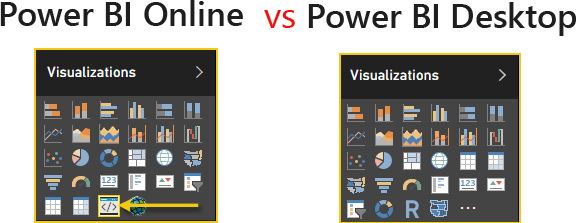
Reason is that icon [shown with the yellow arrow above] doesn't really refer to any "specific" custom visual you create but rather acts mainly as your online testing channel using pbiviz start command, so IOW it can refer to any custom visual you want to test online.
Once you're happy with testing you can then import the custom visual .pbiviz package you created through
File> Import > Power BI Custom visual and it should then display the icon [found in your porject /assets directory] on Visualization panel. Hope this helps
First after signing in with your Power BI Online account
https://app.powerbi.com/
you must check if the following Enable developer visual for testing checkbox is enabled...
Note that you won't find the following Custom Visual icon on Power BI Desktop but only on Power BI Online.
.
Reason is that icon [shown with the yellow arrow above] doesn't really refer to any "specific" custom visual you create but rather acts mainly as your online testing channel using pbiviz start command, so IOW it can refer to any custom visual you want to test online.
Once you're happy with testing you can then import the custom visual .pbiviz package you created through
File> Import > Power BI Custom visual and it should then display the icon [found in your porject /assets directory] on Visualization panel. Hope this helps
Vote for your favorite vizzies from the Power BI World Championship submissions!
If you love stickers, then you will definitely want to check out our Community Sticker Challenge!
Check out the January 2026 Power BI update to learn about new features.
| User | Count |
|---|---|
| 3 | |
| 2 | |
| 2 | |
| 1 | |
| 1 |