Join us at FabCon Atlanta from March 16 - 20, 2026, for the ultimate Fabric, Power BI, AI and SQL community-led event. Save $200 with code FABCOMM.
Register now!The Power BI Data Visualization World Championships is back! Get ahead of the game and start preparing now! Learn more
How can i conenct my local computer to the virtual SQL server on premises.
i tried Get Data option(SQL database) , but the authentication is failed evertime i try (both Windows & SQL auth) failed.
How can i connect directly to SSMS from my pc thorugh PowerBi, without installing SSMS in my local PC?
Solved! Go to Solution.
Hi @Anonymous
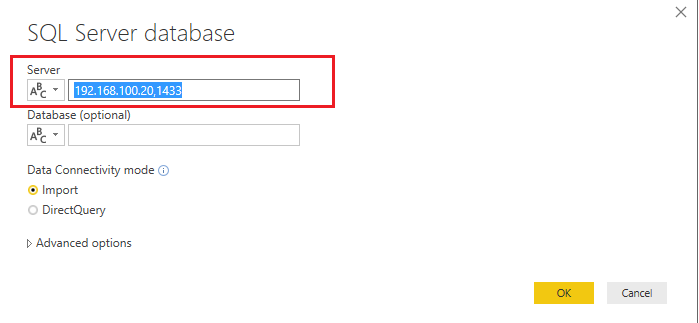
I think you can try to connect to your remote SQL Server by IP address with your Power BI Desktop. Here is using (IP,Port) for the Server field in Power BI Desktop.
Here a good article about how to identify SQL Server TCP IP port being used for your reference.
Best Regards,
Rico Zhou
If this post helps, then please consider Accept it as the solution to help the other members find it more quickly.
Hi @Anonymous
I think you can try to connect to your remote SQL Server by IP address with your Power BI Desktop. Here is using (IP,Port) for the Server field in Power BI Desktop.
Here a good article about how to identify SQL Server TCP IP port being used for your reference.
Best Regards,
Rico Zhou
If this post helps, then please consider Accept it as the solution to help the other members find it more quickly.
The Power BI Data Visualization World Championships is back! Get ahead of the game and start preparing now!
| User | Count |
|---|---|
| 3 | |
| 2 | |
| 1 | |
| 1 | |
| 1 |
| User | Count |
|---|---|
| 9 | |
| 6 | |
| 4 | |
| 4 | |
| 3 |