Get certified for free when you join Fabric Data Days 2026 and dive into Fabric, Power BI, SQL, AI, and other essential data skills.
Join nowJuly 7 - July 17 | Round 2 of the Power BI Dataviz World Championships. Don't miss your chance! Learn more
How can i conenct my local computer to the virtual SQL server on premises.
i tried Get Data option(SQL database) , but the authentication is failed evertime i try (both Windows & SQL auth) failed.
How can i connect directly to SSMS from my pc thorugh PowerBi, without installing SSMS in my local PC?
Solved! Go to Solution.
Hi @Anonymous
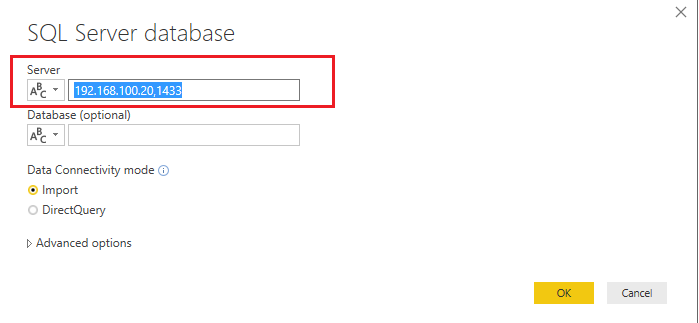
I think you can try to connect to your remote SQL Server by IP address with your Power BI Desktop. Here is using (IP,Port) for the Server field in Power BI Desktop.
Here a good article about how to identify SQL Server TCP IP port being used for your reference.
Best Regards,
Rico Zhou
If this post helps, then please consider Accept it as the solution to help the other members find it more quickly.
Hi @Anonymous
I think you can try to connect to your remote SQL Server by IP address with your Power BI Desktop. Here is using (IP,Port) for the Server field in Power BI Desktop.
Here a good article about how to identify SQL Server TCP IP port being used for your reference.
Best Regards,
Rico Zhou
If this post helps, then please consider Accept it as the solution to help the other members find it more quickly.
Join us in Barcelona for FabCon and SQLCon, the Fabric, Power BI, SQL, and AI community event. Save €200 with code FABCMTY200.
Join Fabric Data Days 2026: 60 days of free live/on-demand sessions, challenges, study groups, and certification opportunities.
| User | Count |
|---|---|
| 5 | |
| 3 | |
| 2 | |
| 2 | |
| 2 |