cancel
Showing results for 
Search instead for 
Did you mean: 

July 7 - July 17 | Round 2 of the Power BI Dataviz World Championships. Don't miss your chance! Learn more

Reply
Valera
Regular Visitor

Data source for dataset with incremental refresh cannot be updated via REST API

Hi!

There is a PBIX with data source options. I publish it to the workspace and try to update the data source via API endpoint.
But this endpoint does not update the existing data source but adds a new one.
As a result, the dataset has 2 data sources.
This behavior is observed only for datasets with an incremental refresh.
In regular reports, the data source is updated successfully.


How can I update the data source for such a report?

Thanks,
Valera


4 REPLIES 4
Dan2
Helper I
Helper I

Hi Valera, did you get an answer for this? I have the exact same problem where it is creating a new datasource instead of updating on incremental refreshes. 

Valera
Regular Visitor

Hi @Dan2 
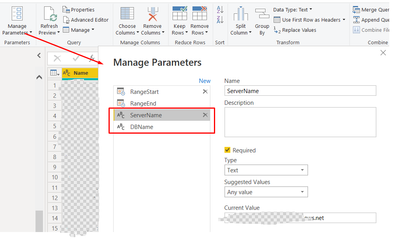
Unfortunately not. But we were able to bypass this issue via parameters. We added ServerName and DbName parameters to report:

Valera_0-1702890555685.png

And updated them using this endpoint: https://learn.microsoft.com/en-us/rest/api/power-bi/datasets/update-parameters

Valera
Regular Visitor

Hi @yingyinr,
Thanks for your answer.
Nothing from mentioned limitations is related to my dataset.
XMLA endpoints wern't used.
Data source is SQL server.
There are no parameters in connection details: just plain server address and DB name.
Also, there was mentioned that "The original data source and the new data source must have the exact same schema."
Not sure what it means, but seems to be not related to my case.
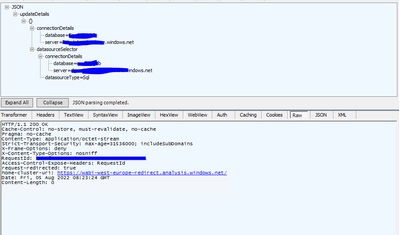
Here are API endpoints that I execute:
Retrieving of existing datasources:

Valera_0-1659687593860.png

Updating this datasource via UpdateDatasource endpoint:

Valera_1-1659688008124.png

Retrieving datasources after update:

Valera_2-1659688110296.png

As a result a new datasource was added instead of updating of existing one.
I also checked the same report without incremental refresh.
It works as expected. The existing datasource is updated.

Anonymous
Not applicable

Hi @Valera ,

Please check if it hit any following limitations, you can find the details in your shared documentation....

yingyinr_0-1659681516066.png

If the dataset didn't hit any above limitation, please provide the involved data sources in the dataset and executed operations on it. Thank you.

Best Regards

Helpful resources

Announcements
FabCon and SQLCon Barcelona 2026

FabCon & SQLCon – Barcelona 2026

Join us in Barcelona for FabCon and SQLCon, the Fabric, Power BI, SQL, and AI community event. Save €200 with code FABCMTY200.

60 days of Data Days Carousel

Data Days 2026

Join Fabric Data Days 2026: 60 days of free live/on-demand sessions, challenges, study groups, and certification opportunities.

Power BI DataViz World Championships carousel

Power BI DataViz World Championships - June 2026

A new Power BI DataViz World Championship is coming this June! Don't miss out on submitting your entry.