Get certified for free when you join Fabric Data Days 2026 and dive into Fabric, Power BI, SQL, AI, and other essential data skills.
Join nowJuly 28 - August 9 | Final Round of the Power BI Dataviz World Championships. This is your chance. Learn more
hello all,
We have one existing report created by consulant. In this particlar report he compared 1st half of FY (july 2018 to Dec 2018) to 2nd half of FY (Jan 2019 to June 2019). And its work great for this Fiscal year.
Consultant uses DAX Date Template is a Power BI template file containing a fully-featured Date table. consultant is not availble.
Now we have have new fiscal year.
I need to compare jan 2019 to june 2019 VS jul 2019 to dec 2019.
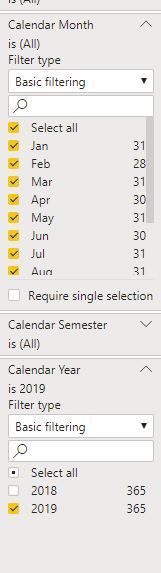
I changed adjust a filter so that only the year we need is shown but its showing only jan 2019 to june 2019.
Any help will be appreciated.
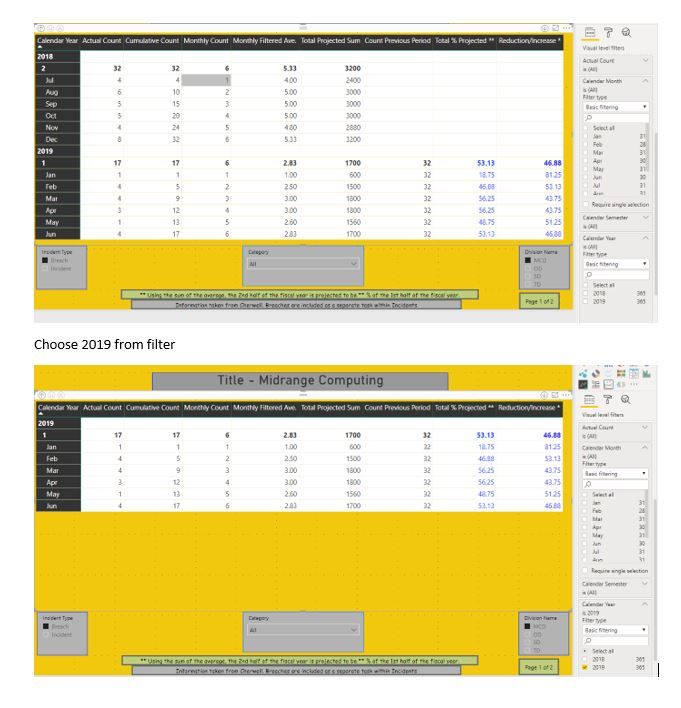
Here are the screeshot. First screen shot is current. comparing (july 2018 to Dec 2018) to 2nd half of FY (Jan 2019 to June 2019).
On second snap shot I checked on year 2019 only.
I want
It should compare
(Jan 2019 to June 2019) VS (july 2019 to Dec 2019)
here is the DAX template consultant uses.
Do I need to replace 2018 to 2019?
https://drive.google.com/open?id=1QtcO-EsLM7dO2zE6jCbiNlvTYVstOHbI
Join us in Barcelona for FabCon and SQLCon, the Fabric, Power BI, SQL, and AI community event. Save €200 with code FABCMTY200.
If you love stickers, then you will definitely want to check out our community sticker challenge, Barcelona edition!
Check out the July 2026 Power BI update to learn about new features.
| User | Count |
|---|---|
| 2 | |
| 2 | |
| 1 | |
| 1 | |
| 1 |
| User | Count |
|---|---|
| 4 | |
| 3 | |
| 2 | |
| 2 | |
| 1 |