I'm creating a custom visual that uses some simple integer static settings objects. However the edit box that allows me to edit the values does not appear. The sample text based property appears with an edit box, but my integer properties have no edit box. I would like my Height and Width settings objects to have editable fields like the General section does, below.
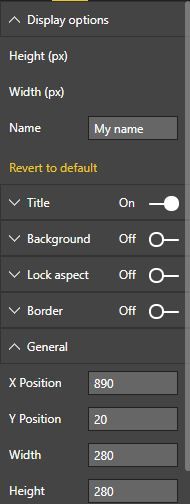
I'm using powerbi.extensibility.utils.dataview.DataViewObjectsParser to manage my settings as in the default PbiViz example visual.
My capabilities.json definition:
"objects": {
        "imageOptions": {
            "displayName": "Display options",
          "properties": {
            "height": {
              "displayName": "Height (px)",
              "type": {
                "integer": true
              }
            },
            "width": {
              "displayName": "Width (px)",
              "type": {
                "integer": true
              }
            },
            "propName": {
              "displayName": "Name",
              "type": {
                "text": true
              }
            }
          }
        }
    },
Settings.ts file using DataViewObjectsParser:
module powerbi.extensibility.visual {
    "use strict";
    import DataViewObjectsParser = powerbi.extensibility.utils.dataview.DataViewObjectsParser;

    export class VisualSettings extends DataViewObjectsParser {
        public imageOptions: imageSettings = new imageSettings();
      }

    export class imageSettings {
        public height: number = 480;
        public width: number = 640;
        public propName: string = "My name";
     }
}
My enumerateObjectInstances uses DataViewObjectsParser:
        public enumerateObjectInstances(options: EnumerateVisualObjectInstancesOptions): VisualObjectInstance[] | VisualObjectInstanceEnumerationObject {
            return VisualSettings.enumerateObjectInstances(this.settings || VisualSettings.getDefault(), options);
        }
I looked at the Sample Bar Chart example, which also has an integer static object, but it uses a different approach and sets min and max valid values, which creates a slider selector.


