Hello,
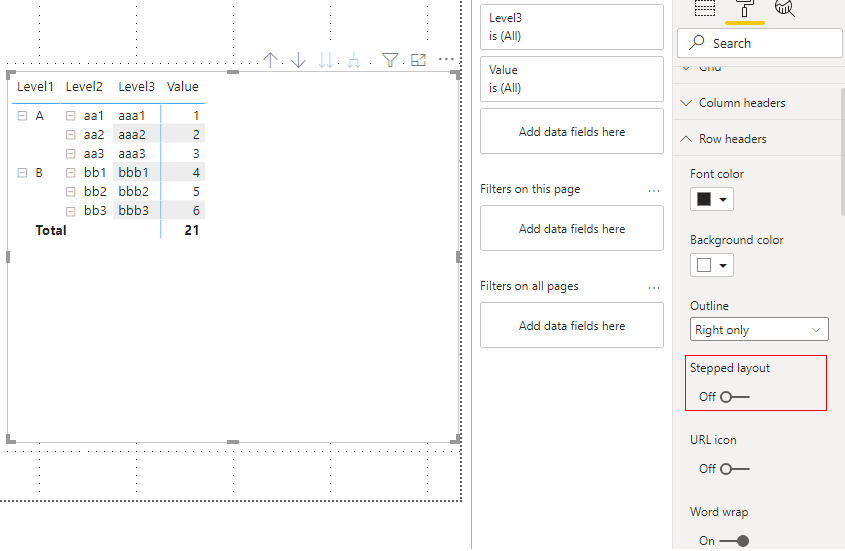
I would like to create hierarchical column like this one below:

I already created hierarchy in dataset:
  private static hierarchyDataset(
    dataView: DataView,
    taskTypes: TaskTypes,
    settings: GanttSettings,
    host: IVisualHost
  😞 Task[] | any[] {
    let tasks: Task[] = [];
    const values: GanttColumns<any> =
      GanttColumns.getCategoricalValues(dataView);

    if (!values.yAxis) {
      return tasks;
    }

    const groupValues: GanttColumns<DataViewValueColumn>[] =
      GanttColumns.getGroupedValueColumns(dataView);

    let endDate: ISegment = { date: null, name: "" };

    for (let j = 0; j < values.yAxis.length; j++) {
      for (let index = 0; index < values.yAxis[0].length; index++) {
        let seriesName: TaskTypeMetadata = null;
        let wasDowngradeDurationUnit: boolean = false;
        let stepDurationTransformation: number = 0;
        let segment: ISegment[] = [];
        const selectionBuilder: ISelectionIdBuilder = host
          .createSelectionIdBuilder()
          .withCategory(dataView.categorical.categories[0], index);

        if (groupValues) {
          groupValues.forEach((group: GanttColumns<any>) => {
            if (group.endDate && group.endDate.values[index] !== null) {
              seriesName = find(
                taskTypes.types,
                (typeMeta: TaskTypeMetadata) =>
                  typeMeta.name === group.endDate.source.groupName
              );

              if (seriesName) {
                selectionBuilder.withCategory(seriesName.selectionColumn, 0);
              }
              endDate = {
                date: group.endDate.values[index]
                  ? moment(group.endDate.values[index] as Date)
                  : null,
                name: group.endDate.source.displayName,
                showOnTooltip: !!group.endDate.values[index],
                role: `endDate`,
              };

              if (typeof endDate === "string" || typeof endDate === "number") {
                endDate = endDate;
              }
            }

            group.segment.map((d, i) => {
              if (d && d.values[index] !== null) {
                seriesName = find(
                  taskTypes.types,
                  (typeMeta: TaskTypeMetadata) =>
                    typeMeta.name === d.source.groupName
                );

                if (seriesName) {
                  selectionBuilder.withCategory(seriesName.selectionColumn, 0);
                }
                segment[i] = {
                  date:
                    d.values[index] && Date.parse(d.values[index])
                      ? moment(d.values[index] as Date)
                      : null,
                  name: d.source.displayName || null,
                  showOnTooltip: !!d.values[index],
                  role: `segment${i}`,
                };
              }
            });
          });
        }

        const selectionId: powerbi.extensibility.ISelectionId =
          selectionBuilder.createSelectionId();

        const categoryValues: string[] = [];

        values.yAxis.map((d, i) => {
          categoryValues.push(d[index]);
        });

        let startDate: ISegment = { date: null, name: "" };
        startDate = {
          date: values.startDate && moment(values.startDate[index]),
          name: dataView.categorical.categories.filter(
            (d) => d.source.roles.startDate
          )[0].source.displayName,
          showOnTooltip: !!values.startDate[index],
          role: `startDate`,
        };

        const milestoneDate: Date =
          ((values.milestoneDate &&
            !isEmpty(values.milestoneDate[index]) &&
            values.milestoneDate[index]) as Date) || null;

        const task: Task = {
          index: index,
          yAxis: categoryValues,
          name: categoryValues[j],
          parentName: j === 0 ? null : categoryValues[j - 1],
          parentID: j === 0 ? null : j - 1,
          children: [],
          startDate: startDate,
          endDate: endDate,
          segments: Object.assign([], [startDate, ...segment, endDate]),
          visibility: true,
          seriesName: seriesName && seriesName.name,
          selected: false,
          identity: selectionId,
          wasDowngradeDurationUnit,
          stepDurationTransformation,
          milestoneDate: milestoneDate && moment(milestoneDate),
        };

        tasks.forEach((task) => {
          if (task.endDate && task.startDate) {
            task.endDate = task.endDate;
          } else {
            task.endDate = task.startDate;
          }
        });

        tasks.push(task);
      }
    }

    return tasks;
  }

//---------
  private prepareHierarchyData(tasks) {
    _(tasks).forEach((f) => {
      f.children = _(tasks)
        .filter((g) => g.parentName === f.name)
        .value();
    });

    const resultArray = _(tasks)
      .filter((f) => f.parentName === null)
      .value();

    return _.unionBy(resultArray, (d) => d.name);
  }
My capabilities.json looks like that:
    "dataRoles": [
        {
            "displayName": "yAxis",
            "name": "yAxis",
            "kind": "Grouping"
        },
        {
            "displayName": "Legend",
            "name": "projectStatus",
            "kind": "Grouping"
        },
        {
            "displayName": "Milestone",
            "name": "milestoneDate",
            "kind": "Grouping"
        },
        {
            "displayName": "Start Date",
            "name": "startDate",
            "kind": "Grouping"
        },
        {
            "displayName": "End Date",
            "name": "endDate",
            "kind": "Measure"
        },
        {
            "displayName": "Phases",
            "name": "segment",
            "kind": "Measure"
        }
    ],
    "dataViewMappings": [
        {
            "conditions": [
                {
                    "yAxis": {
                        "max": 5
                    },
                    "projectStatus": {
                        "max": 1
                    },
                    "milestoneDate": {
                        "max": 1
                    },
                    "startDate": {
                        "max": 1
                    },
                    "endDate": {
                        "max": 1
                    },
                    "segment": {
                        "max": 10
                    }
                }
            ],
            "categorical": {
                "categories": {
                    "select": [
                        {
                            "for": {
                                "in": "yAxis"
                            }
                        },
                        {
                            "for": {
                                "in": "milestoneDate"
                            }
                        },
                        {
                            "for": {
                                "in": "startDate"
                            }
                        }
                    ]
                },
                "values": {
                    "group": {
                        "by": "projectStatus",
                        "select": [
                            {
                                "for": {
                                    "in": "endDate"
                                }
                            },
                            {
                                "for": {
                                    "in": "segment"
                                }
                            }
                        ]
                    }
                }
            }
        }
    ],
I don't know how to move on. I was trying to create sth like these here https://observablehq.com/@d3/icicle?ui=classic but I don't have values so it doesn't work for me since I have dates only. Also I was reading about treemap but I don't know how to use it in that case.
Do you have any examples or solutions how to draw hierarchical table ? It doesn't has to be with plus/minus button.
I will be gratefull for any answear.