cancel
Showing results for 
Search instead for 
Did you mean: 

Try your skills in the Power BI Dataviz World Championship! Round one ends June 26. Join now

Reply
ochaoui
Frequent Visitor

Custom connector : pass UI values to StartLogin function

Hi Folks,


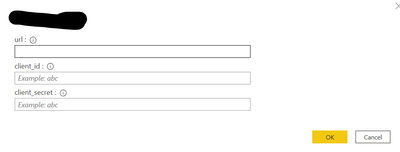
I am developing a custom connector where the user write down on the UI :

- the API URL

- the client_id

-the client_secret

ochaoui_0-1637765484023.png


I would like to know how to pass the client_id and client_secret to my  StartLogin and  FinishLogin ?

Thanks in advance.


Regards,

1 ACCEPTED SOLUTION

Hi @Anonymous ,


Thanks for your reply but it does not reply to my problem.


I found the solution to get those values :

StartLogin = (clientApplication, dataSourcePath, state, display) =>
    let
      authorizeUrl = AUTHORIZE_URI & "?" & Uri.BuildQueryString([
        response_type = "code",
        client_id = Json.Document(dataSourcePath)[client_id],  
        redirect_uri = REDIRECT_URI,
        state1 = state,
        scope = GetScopeString(SCOPES, SCOPE_PREFIX)
      ])
    in
      [
        LoginUri = authorizeUrl,
        CallbackUri = REDIRECT_URI,
        WindowHeight = WINDOW_HEIGHT,
        WindowWidth = WINDOW_WIDTH,
        Context = null
      ];

You need to parse the "dataSourcePath" variable.


Regards,

View solution in original post

2 REPLIES 2
Anonymous
Not applicable

Hi @ochaoui 

1. Create a Data Source definition

//
// Data Source definition
//
GithubSample = [
    Authentication = [
        OAuth = [
            StartLogin = StartLogin,
            FinishLogin = FinishLogin
        ]
    ],
    Label = Extension.LoadString("DataSourceLabel")
];

2. Provide details so the M engine can start the OAuth flow.

The following code snippet describes how to implement a StartLogin function to start the login flow. 

StartLogin = (resourceUrl, state, display) =>
        let
            AuthorizeUrl = "https://github.com/login/oauth/authorize?" & Uri.BuildQueryString([
                client_id = client_id,
                scope = "user, repo",
                state = state,
                redirect_uri = redirect_uri])
        in
            [
                LoginUri = AuthorizeUrl,
                CallbackUri = redirect_uri,
                WindowHeight = windowHeight,
                WindowWidth = windowWidth,
                Context = null
            ];

For more details you may refer to this offical blog: GitHub Connector Sample


Best Regards,
Rico Zhou


If this post helps, then please consider Accept it as the solution to help the other members find it more quickly.


Hi @Anonymous ,


Thanks for your reply but it does not reply to my problem.


I found the solution to get those values :

StartLogin = (clientApplication, dataSourcePath, state, display) =>
    let
      authorizeUrl = AUTHORIZE_URI & "?" & Uri.BuildQueryString([
        response_type = "code",
        client_id = Json.Document(dataSourcePath)[client_id],  
        redirect_uri = REDIRECT_URI,
        state1 = state,
        scope = GetScopeString(SCOPES, SCOPE_PREFIX)
      ])
    in
      [
        LoginUri = authorizeUrl,
        CallbackUri = REDIRECT_URI,
        WindowHeight = WINDOW_HEIGHT,
        WindowWidth = WINDOW_WIDTH,
        Context = null
      ];

You need to parse the "dataSourcePath" variable.


Regards,

Helpful resources

Announcements
Fabric Data Days is here Carousel

Data Days 2026

Don't miss out on Data Days, June 15 through August 7. Learn Fabric, Power BI, SQL, AI and more.

May Power BI Update Carousel

Power BI Monthly Update - May 2026

Check out the May 2026 Power BI update to learn about new features.

Power BI DataViz World Championships carousel

Power BI DataViz World Championships - June 2026

A new Power BI DataViz World Championship is coming this June! Don't miss out on submitting your entry.