cancel
Showing results for 
Search instead for 
Did you mean: 

The Power BI Data Visualization World Championships is back! Get ahead of the game and start preparing now! Learn more

Reply
Anonymous
Not applicable

Custom Visual - pbiviz package error

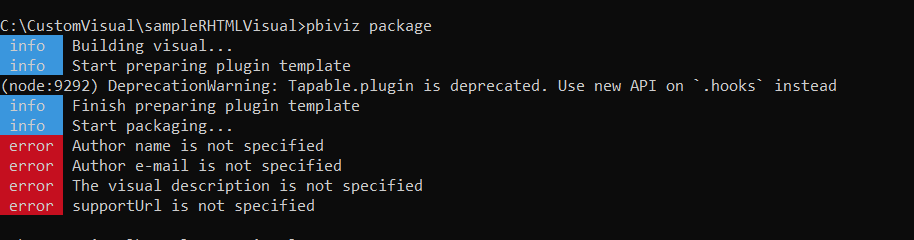
I'm trying to create a custom visual, however while executing pbiviz package  I've obtained those errors (see image) and then, the visual is not created..
Any idea in how to solve this problem?

Capturar.PNGThanks very much!


1 ACCEPTED SOLUTION
dm-p
Super User
Super User

Hi there,

A packaged visual expects a bit more info. You need to edit your pbiviz.json and fill in the fields specified before the package process will work.

So, let's say your file looks like this (which is pretty much the default after creating):


{
    "visual": {
        "name": "myVisual",
        "displayName": "myVisual",
        "guid": "myVisualD7CD469BA41A483C8C1576E59A1D23E3",
        "visualClassName": "Visual",
        "version": "1.0.0",
        "description": "",
        "supportUrl": "",
        "gitHubUrl": ""
    },
    "apiVersion": "2.6.0",
    "author": {
        "name": "",
        "email": ""
    },
    "assets": {
        "icon": "assets/icon.png"
    },
    "externalJS": null,
    "style": "style/visual.less",
    "capabilities": "capabilities.json",
    "dependencies": null,
    "stringResources": []
}

You need to add values to the author (name and email), description and supportUrl fields, e.g.:


{
    "visual": {
        "name": "myVisual",
        "displayName": "myVisual",
        "guid": "myVisualD7CD469BA41A483C8C1576E59A1D23E3",
        "visualClassName": "Visual",
        "version": "1.0.0",
        "description": "My cool visual",
        "supportUrl": "https://www.google.com",
        "gitHubUrl": ""
    },
    "apiVersion": "2.6.0",
    "author": {
        "name": "My Name",
        "email": "my.email@email.com"
    },
    "assets": {
        "icon": "assets/icon.png"
    },
    "externalJS": null,
    "style": "style/visual.less",
    "capabilities": "capabilities.json",
    "dependencies": null,
    "stringResources": []
}

Obviosuly, you'd be better putting informative values in there, particularly if you want to distribute your visual to other users but this will get you moving.

Good luck!

Daniel


Did I answer your question? Mark my post as a solution!

Proud to be a Super User!


On how to ask a technical question, if you really want an answer (courtesy of SQLBI)


View solution in original post

2 REPLIES 2
dm-p
Super User
Super User

Hi there,

A packaged visual expects a bit more info. You need to edit your pbiviz.json and fill in the fields specified before the package process will work.

So, let's say your file looks like this (which is pretty much the default after creating):


{
    "visual": {
        "name": "myVisual",
        "displayName": "myVisual",
        "guid": "myVisualD7CD469BA41A483C8C1576E59A1D23E3",
        "visualClassName": "Visual",
        "version": "1.0.0",
        "description": "",
        "supportUrl": "",
        "gitHubUrl": ""
    },
    "apiVersion": "2.6.0",
    "author": {
        "name": "",
        "email": ""
    },
    "assets": {
        "icon": "assets/icon.png"
    },
    "externalJS": null,
    "style": "style/visual.less",
    "capabilities": "capabilities.json",
    "dependencies": null,
    "stringResources": []
}

You need to add values to the author (name and email), description and supportUrl fields, e.g.:


{
    "visual": {
        "name": "myVisual",
        "displayName": "myVisual",
        "guid": "myVisualD7CD469BA41A483C8C1576E59A1D23E3",
        "visualClassName": "Visual",
        "version": "1.0.0",
        "description": "My cool visual",
        "supportUrl": "https://www.google.com",
        "gitHubUrl": ""
    },
    "apiVersion": "2.6.0",
    "author": {
        "name": "My Name",
        "email": "my.email@email.com"
    },
    "assets": {
        "icon": "assets/icon.png"
    },
    "externalJS": null,
    "style": "style/visual.less",
    "capabilities": "capabilities.json",
    "dependencies": null,
    "stringResources": []
}

Obviosuly, you'd be better putting informative values in there, particularly if you want to distribute your visual to other users but this will get you moving.

Good luck!

Daniel


Did I answer your question? Mark my post as a solution!

Proud to be a Super User!


On how to ask a technical question, if you really want an answer (courtesy of SQLBI)


Anonymous
Not applicable

Thanks very much, now it is working!

Helpful resources

Announcements
Power BI DataViz World Championships

Power BI Dataviz World Championships

The Power BI Data Visualization World Championships is back! Get ahead of the game and start preparing now!

December 2025 Power BI Update Carousel

Power BI Monthly Update - December 2025

Check out the December 2025 Power BI Holiday Recap!

FabCon Atlanta 2026 carousel

FabCon Atlanta 2026

Join us at FabCon Atlanta, March 16-20, for the ultimate Fabric, Power BI, AI and SQL community-led event. Save $200 with code FABCOMM.