Get certified for free when you join Fabric Data Days 2026 and dive into Fabric, Power BI, SQL, AI, and other essential data skills.
Join nowJuly 7 - July 17 | Round 2 of the Power BI Dataviz World Championships. Don't miss your chance! Learn more
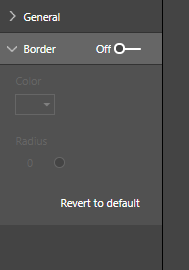
Hi I am creating my custom visual, it works fine except I'd like to set the border on as default. How do I do it in the code behind?Thanks
Solved! Go to Solution.
Hi @Anonymous ,
I've asked a similar question previously and the answer is that defaults cannot be controlled via the framework. It is possible to 'overload' properties into these menus but they will not respond to other settings that are part of core Power BI properties (such as turning the menu off/on).
Not the answer you were after, but might help with starting to find an alternate approach to fit your requirements.
Regards,
Daniel
Proud to be a Super User!
On how to ask a technical question, if you really want an answer (courtesy of SQLBI)
Hi @Anonymous ,
I've asked a similar question previously and the answer is that defaults cannot be controlled via the framework. It is possible to 'overload' properties into these menus but they will not respond to other settings that are part of core Power BI properties (such as turning the menu off/on).
Not the answer you were after, but might help with starting to find an alternate approach to fit your requirements.
Regards,
Daniel
Proud to be a Super User!
On how to ask a technical question, if you really want an answer (courtesy of SQLBI)
Join us in Barcelona for FabCon and SQLCon, the Fabric, Power BI, SQL, and AI community event. Save €200 with code FABCMTY200.
Join Fabric Data Days 2026: 60 days of free live/on-demand sessions, challenges, study groups, and certification opportunities.