cancel
Showing results for 
Search instead for 
Did you mean: 

Level up your Power BI skills this month - build one visual each week and tell better stories with data! Get started

Reply
Anonymous
Not applicable

Custom Visual - Set Border On as Default

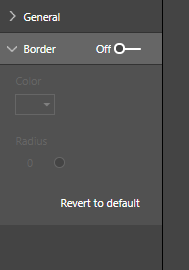
Hi I am creating my custom visual, it works fine except I'd like to set the border on as default.  How do I do it in the code behind?Thanks


2019_07_01_09_34_25_Power_BI.png


1 ACCEPTED SOLUTION
dm-p
Super User
Super User

Hi @Anonymous ,

I've asked a similar question previously and the answer is that defaults cannot be controlled via the framework. It is possible to 'overload' properties into these menus but they will not respond to other settings that are part of core Power BI properties (such as turning the menu off/on).

Not the answer you were after, but might help with starting to find an alternate approach to fit your requirements.

Regards,

Daniel


Did I answer your question? Mark my post as a solution!

Proud to be a Super User!


On how to ask a technical question, if you really want an answer (courtesy of SQLBI)


View solution in original post

2 REPLIES 2
dm-p
Super User
Super User

Hi @Anonymous ,

I've asked a similar question previously and the answer is that defaults cannot be controlled via the framework. It is possible to 'overload' properties into these menus but they will not respond to other settings that are part of core Power BI properties (such as turning the menu off/on).

Not the answer you were after, but might help with starting to find an alternate approach to fit your requirements.

Regards,

Daniel


Did I answer your question? Mark my post as a solution!

Proud to be a Super User!


On how to ask a technical question, if you really want an answer (courtesy of SQLBI)


Anonymous
Not applicable

@dm-p Not so custom after all.......

Thought it was just because of Monday

Helpful resources

Announcements
April Power BI Update Carousel

Power BI Monthly Update - April 2026

Check out the April 2026 Power BI update to learn about new features.

Fabric SQL PBI Data Days

Data Days 2026 coming soon!

Sign up to receive a private message when registration opens and key events begin.

New to Fabric survey Carousel

New to Fabric Survey

If you have recently started exploring Fabric, we'd love to hear how it's going. Your feedback can help with product improvements.

Power BI DataViz World Championships carousel

Power BI DataViz World Championships - June 2026

A new Power BI DataViz World Championship is coming this June! Don't miss out on submitting your entry.