cancel
Showing results for 
Search instead for 
Did you mean: 

Learn from the best! Meet the four finalists headed to the FINALS of the Power BI Dataviz World Championships! Register now

Reply
giammariam
Solution Sage
Solution Sage

Custom Visual - Empty Table DateViewMapping on Initial Load

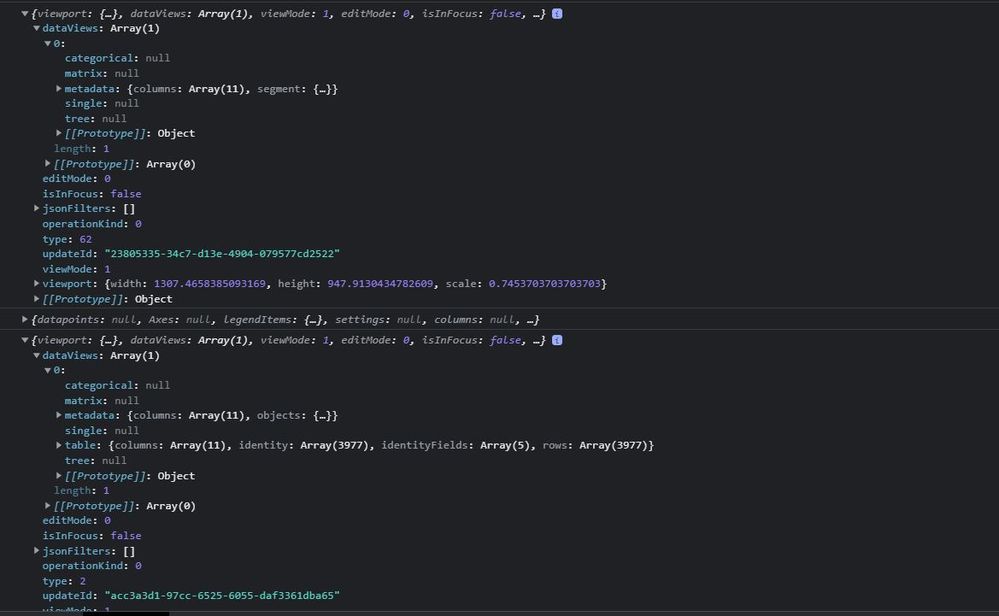
I'm using table dataviewmapping. I'm running into a situation where when I first initialze my custom viz, the dataviewmapping does not show the table dataview. It seems as though another update is immediately called and then the table dataview is populated.

In the VisualUpdateOptions, the inital update is of type 62 ('All') and the second immediate update is of type 2 ('Data'). Because the initial update does not return a table dataview, my viz always errors out on initial load. Once I refresh or trigger some other type of update (e.g. resize), the viz appears as expected. 

The below screenshot of dev tools depicts what I'm seeing in the VisualUpdateOptions.


Any help would be greatly appreciated. 
Capture.JPG


Madison Giammaria
Proud to be a Super User 😄
LinkedIn

Do you frequently use Deneb to provide insights to your stakeholders? Have you considered sponsoring this free and open source custom visual? More info here!
1 REPLY 1
V-lianl-msft
Community Support
Community Support

Sorry, I haven't encountered this situation. May it be the issue of too large dataset or conflicting data keys?

Helpful resources

Announcements
Power BI DataViz World Championships carousel

Power BI DataViz World Championships - June 2026

A new Power BI DataViz World Championship is coming this June! Don't miss out on submitting your entry.

Join our Fabric User Panel

Join our Fabric User Panel

Share feedback directly with Fabric product managers, participate in targeted research studies and influence the Fabric roadmap.

March Power BI Update Carousel

Power BI Community Update - March 2026

Check out the March 2026 Power BI update to learn about new features.