Don't miss your chance to take the Fabric Data Engineer (DP-600) exam for FREE! Find out how by watching the DP-600 session on-demand now through April 28th.
Learn moreJoin the FabCon + SQLCon recap series. Up next: Power BI, Real-Time Intelligence, IQ and AI, and Data Factory take center stage. All sessions are available on-demand after the live show. Register now
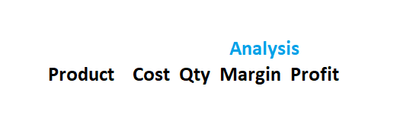
I have a table like this
and I want to put a banner "Analysis" right on top of Margin. When I move the slider from left to right in the table it should move along the column margin.
Or when my mouse move over the half of the table this banner should pop up on top of Margin column and stay there till I move back to the left side of the table.
Thanks
Bishwa
You can put more than one field in the column headers section.
Thank you for letting me know. I really appreciate it. Could you tell me how to do it please ?
Let's assume you have a parent field "Category" and a child field "KPI". Create a matrix visual and put both fields in the column area. Note that you now have the hierarchy arrows available. Click the one that looks like a trident with a missing tooth ( a duodent?). That will show both fields .
Check out the April 2026 Power BI update to learn about new features.
If you have recently started exploring Fabric, we'd love to hear how it's going. Your feedback can help with product improvements.
A new Power BI DataViz World Championship is coming this June! Don't miss out on submitting your entry.
| User | Count |
|---|---|
| 2 | |
| 1 | |
| 1 | |
| 1 | |
| 1 |
| User | Count |
|---|---|
| 8 | |
| 8 | |
| 4 | |
| 3 | |
| 2 |