cancel
Showing results for 
Search instead for 
Did you mean: 

The Power BI Data Visualization World Championships is back! It's time to submit your entry. Live now!

Reply
BishwaR
Helper V
Helper V

Custom Header

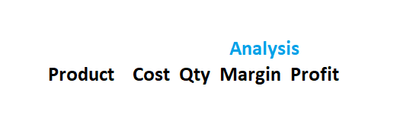
I have a table like this

and I want to put a banner "Analysis" right on top of Margin. When I move the slider  from left to right in the table it should move along the column margin.

BishwaR_0-1643328808678.png

Or when my mouse move over the half of the table this banner should pop up on top of Margin column and stay there till I move back to the left side of the table.


Thanks


Bishwa


3 REPLIES 3
lbendlin
Super User
Super User

You can put more than one field in the column headers section.

Thank you for letting me know. I really appreciate it. Could you tell me how to do it please ?

Let's assume you have a parent field "Category" and a child field "KPI". Create a matrix visual and put both fields in the column area. Note that you now have the hierarchy arrows available. Click the one that looks like a trident with a missing tooth ( a duodent?). That will show both fields .

Helpful resources

Announcements
FabCon Atlanta 2026 carousel

FabCon Atlanta 2026

Join us at FabCon Atlanta, March 16-20, for the ultimate Fabric, Power BI, AI and SQL community-led event. Save $200 with code FABCOMM.