Join us at FabCon Atlanta from March 16 - 20, 2026, for the ultimate Fabric, Power BI, AI and SQL community-led event. Save $200 with code FABCOMM.
Register now!The Power BI Data Visualization World Championships is back! Get ahead of the game and start preparing now! Learn more
Good day!
I am trying to add custom coloring to my visual, but I have trouble implementing this with grouping.
Situation:
The data consists of multiple projects, which in turn have multiple milestones. Basically it's a line graph, with a line for each milestone. The user has two options:
1) Draw all milestones from only one project. The user can change the color of each milestone. (This already works)
2) Draw all milestones from all projects inside one graph. In this situation all milestones within one project have the same color (works). The user should be able to change the color of a project with custom formatting. (This doesn't work)
snippet from capabilities.json:
"dataRoles": [
{
"displayName": "Date",
"name": "date",
"kind": "Grouping"
},
{
"displayName": "Milestones",
"name": "milestones",
"kind": "Measure"
},
{
"displayName": "Project Name",
"name": "project",
"kind": "Grouping"
}
],
"dataViewMappings": [
{
"categorical": {
"categories": {
"for": {
"in": "date"
}
},
"values": {
"group": {
"by": "project",
"select": [
{
"for": {
"in": "milestones"
}
}
]
}
}
}
}
],
snippet from enumerateObjectInstances function:
objectEnumeration.push({
objectName: objectName,
displayName: project.name,
properties: {
lineColor: ms.colorLine
},
propertyInstanceKind: {
fill: VisualEnumerationInstanceKinds.ConstantOrRule
},
selector: selectionId.getSelector()
});
Problem:
I can't implement Situation 2). I think the problem is the selector. Among others I tried the following:
A) selectionId = host.createSelectionIdBuilder().withCategory(categories, i).createSelectionId();
B) selectionId = host.createSelectionIdBuilder().withMeasure(ms.source.groupName.toString()).createSelectionId();
C) selector = {metadata: column.queryName};
A) The color is saved in categories. However, this only works if there are equal or more categories than groups (not guaranteed). This was just a workaround by me trying to understand how selectors work. I was hoping for a better solution than this.
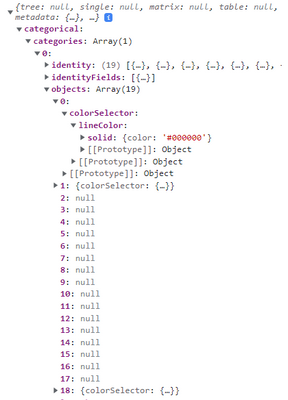
B) This doesn't work. Changing a color doesn't seem to be saved anywhere in dataViews
After changing a color . The selector looks like this:
{
"metadata": "Name of the Group/Project"
}
C) Using this selector changes the color of the milestones (independ of project). E. g. all milestone1 of all projects will be green, all milestone2 will be red...
Does anybody have an idea how I can implement custom formatting of the milestones based on the project? Maybe I also have to change the data model?
Thank you for any help!
Solved! Go to Solution.
Hello Internet,
I think I managed to make it work. It was rather simple:
Basic example
1. Get values grouped
const groups = dataViews[0].categorical.values.grouped()
2. Set selectionId for each group:
values = dataViews[0].categorical.values;
groups.forEach(group => {
selectionIdGroup = host.createSelectionIdBuilder().withSeries(values, group).createSelectionId()
}
3. Set selectionId for each measure:
selectionIdMeasure = host.createSelectionIdBuilder().withMeasure(dataViewColumn.source.queryName).createSelectionId()
4. You can then access these in formatting pane:
let groupColor: powerbi.visuals.FormattingGroup = {
displayName: "Colors",
uid: "colors",
slices: {
displayName: group.name,
uid: "colors_" + group.name,
control: {
type: powerbi.visuals.FormattingComponent.ColorPicker,
properties: {
descriptor: {
objectName: "series",
propertyName: "line",
selector: group.selectionId.getSelector()
},
value: { value: group.colorLine },
}
}
}
};
Hope it helps anyone 🙂
Hello Internet,
I think I managed to make it work. It was rather simple:
Basic example
1. Get values grouped
const groups = dataViews[0].categorical.values.grouped()
2. Set selectionId for each group:
values = dataViews[0].categorical.values;
groups.forEach(group => {
selectionIdGroup = host.createSelectionIdBuilder().withSeries(values, group).createSelectionId()
}
3. Set selectionId for each measure:
selectionIdMeasure = host.createSelectionIdBuilder().withMeasure(dataViewColumn.source.queryName).createSelectionId()
4. You can then access these in formatting pane:
let groupColor: powerbi.visuals.FormattingGroup = {
displayName: "Colors",
uid: "colors",
slices: {
displayName: group.name,
uid: "colors_" + group.name,
control: {
type: powerbi.visuals.FormattingComponent.ColorPicker,
properties: {
descriptor: {
objectName: "series",
propertyName: "line",
selector: group.selectionId.getSelector()
},
value: { value: group.colorLine },
}
}
}
};
Hope it helps anyone 🙂
I came across the very same situation. However it was one of those 'it works but I don't know how situation.
Therefore this extra comment:
For me the using the withSeries(values, group) worked indeed only after using .grouped(). However the values didn't appear in my DataView when I exported it. I had to call the '.grouped()' function again to see the actual values. (JSON.stringify just DROPPED the grouped() result but that didn't mean it wasn't there)
A LOT of headscratches on this one.
I'm struggling with similar issue but not able to get it work even if I try to do exactly same as you.
const groups = dv.categorical.values.grouped();
const values = dv.categorical.values;
groups.forEach(group => {
const selectionIdSeries = host.createSelectionIdBuilder().withSeries(values, group).createSelectionId();
console.log(selectionIdSeries);
});This logs me:
{
"deepestNodeLevelInPath": -1,
"measures": [],
"dataMap": null,
"nodeIsCollapsed": null,
"nodeIndexes": [],
"key": "null[]"
}
Why I get null? What do you get if console log your selection id?
HI @Anonymous,
According to your description, I don't think your requirement can be achieved based on the code in the custom color formatting groups. They should be more suitable to use condition formatting in visuals based on Dax expressions.
Apply conditional table formatting in Power BI - Power BI | Microsoft Docs
You can use dax expressions to look up correspond records based on current row context and apply color code.
BTW, they can be also pre-declared in a table then you can use DAX expression to load these color code settings from that table.
Regards,
Xiaoxin Sheng
The Power BI Data Visualization World Championships is back! Get ahead of the game and start preparing now!
| User | Count |
|---|---|
| 11 | |
| 6 | |
| 4 | |
| 4 | |
| 3 |