Join us at FabCon Atlanta from March 16 - 20, 2026, for the ultimate Fabric, Power BI, AI and SQL community-led event. Save $200 with code FABCOMM.
Register now!Learn from the best! Meet the four finalists headed to the FINALS of the Power BI Dataviz World Championships! Register now
I tried creating "Excel" datasource using PowerBI Rest API. When am calling the CreateDatasource rest api call with parameters am getting error as "Bad request".
Below is the code:
private void btn_createdatasource(object sender, RoutedEventArgs e)
{
PowerBIClient pbiClient = TokenManager.GetPowerBiClient(requiredScopes);
var gateways = pbiClient.Gateways.GetGateways().Value;
var gateway = gateways.First();
var gatewaydatasources = pbiClient.Gateways.GetDatasources(gateway.Id).Value;
// string userName= ConfigurationManager.AppSettings.Get("username");
string userName = System.Security.Principal.WindowsIdentity.GetCurrent().Name;
var datatype = "Excel";
var name = "excelsource";
var password = ConfigurationManager.AppSettings.Get("Password");
var credentials = new WindowsCredentials(userName, password);
var credentialsEncryptor = new AsymmetricKeyEncryptor(gateway.PublicKey);
var credentialDetails = new CredentialDetails(credentials, PrivacyLevel.Private, EncryptedConnection.Encrypted, credentialsEncryptor);
var path =
@"C:\Users\sowmyas\Documents\ReportserverExcelfiles\SuperstoreSales.xlsx";
try {
var request = new PublishDatasourceToGatewayRequest(
dataSourceType: datatype,
connectionDetails: "{ \"path\":\"" + path + "\"}",
credentialDetails: credentialDetails,
dataSourceName: name);
pbiClient.Gateways.CreateDatasource(gateway.Id, request);
MessageBox.Show("Gateway Datasource successfully : " + name);
}
catch (Exception ex)
{
MessageBox.Show("Datasource not created in Gateway. Error: " + ex.Message);
}
}
Error Message:
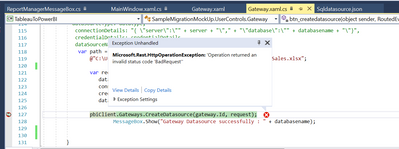
Name Value Type
| ▶ | $exception | {"Operation returned an invalid status code 'BadRequest'"} | Microsoft.Rest.HttpOperationException |
Solved! Go to Solution.
Hi @Anonymous,
It seems like you send the wrong request content to the rest API so that the power bi server return the bad request error.
If you are not so sure how to configuration Datasource connections settings, you can try to publish a sample report to the power bi service side with a similar type of data source and use rest API to get the detailed configuration. After these steps, you can refer to this template to config your own data source settings.
Gateways - Get Datasource - REST API (Power BI Power BI REST APIs) | Microsoft Docs
Regards,
Xiaoxin Sheng
Hi @Anonymous,
It seems like you send the wrong request content to the rest API so that the power bi server return the bad request error.
If you are not so sure how to configuration Datasource connections settings, you can try to publish a sample report to the power bi service side with a similar type of data source and use rest API to get the detailed configuration. After these steps, you can refer to this template to config your own data source settings.
Gateways - Get Datasource - REST API (Power BI Power BI REST APIs) | Microsoft Docs
Regards,
Xiaoxin Sheng
Share feedback directly with Fabric product managers, participate in targeted research studies and influence the Fabric roadmap.
Check out the February 2026 Power BI update to learn about new features.
| User | Count |
|---|---|
| 3 | |
| 2 | |
| 2 | |
| 1 | |
| 1 |
| User | Count |
|---|---|
| 3 | |
| 3 | |
| 2 | |
| 2 | |
| 2 |