

cancel
Showing results for 
Search instead for 
Did you mean: 

Learn from the best! Meet the four finalists headed to the FINALS of the Power BI Dataviz World Championships! Register now

Reply
Anonymous
Not applicable

Tabular Editor - Union tables

Hi,


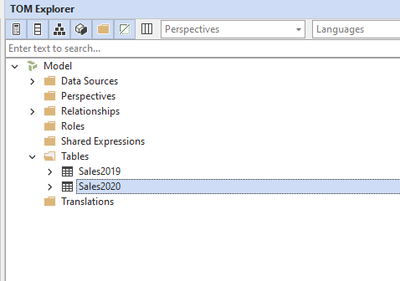
I have imported two tables, how can I combine them in the model using Tabular Editor?


bareanders84_0-1635763649526.png


Regards,

Anders

1 ACCEPTED SOLUTION
Anonymous
Not applicable

Hi @Anonymous ,

Could you consider connecting to the corresponding data source and importing the corresponding tables into Power BI. Then refer to the following blogs to combine the tables?
1. Use DAX

POWER BI – UNION IN DAX

Union in Power BI | union in DAX | append tables using dax

yingyinr_0-1636019838611.png

2. Handle it in Power Query

Combine queries

Combine multiple tables with UNION / UNION ALL in SQL Server, APPEND in Power Query or UNION in DAX

yingyinr_1-1636019946281.png

Best Regards

View solution in original post

1 REPLY 1
Anonymous
Not applicable

Hi @Anonymous ,

Could you consider connecting to the corresponding data source and importing the corresponding tables into Power BI. Then refer to the following blogs to combine the tables?
1. Use DAX

POWER BI – UNION IN DAX

Union in Power BI | union in DAX | append tables using dax

yingyinr_0-1636019838611.png

2. Handle it in Power Query

Combine queries

Combine multiple tables with UNION / UNION ALL in SQL Server, APPEND in Power Query or UNION in DAX

yingyinr_1-1636019946281.png

Best Regards

Helpful resources

Announcements
Join our Fabric User Panel

Join our Fabric User Panel

Share feedback directly with Fabric product managers, participate in targeted research studies and influence the Fabric roadmap.

March Power BI Update Carousel

Power BI Community Update - March 2026

Check out the March 2026 Power BI update to learn about new features.