Get Fabric or SQL Certified for Free.
Get certified for free when you join Fabric Data Days 2026 and dive into Fabric, Power BI, SQL, AI, and other essential data skills.
Join now- Power BI forums
- Get Help with Power BI
- Desktop
- Service
- Report Server
- Power Query
- Mobile Apps
- Developer
- DAX Commands and Tips
- Custom Visuals Development Discussion
- Health and Life Sciences
- Power BI Spanish forums
- Translated Spanish Desktop
- Training and Consulting
- Instructor Led Training
- Dashboard in a Day for Women, by Women
- Galleries
- Data Stories Gallery
- Themes Gallery
- Contests Gallery
- QuickViz Gallery
- Quick Measures Gallery
- Visual Calculations Gallery
- Notebook Gallery
- Translytical Task Flow Gallery
- TMDL Gallery
- R Script Showcase
- Webinars and Video Gallery
- Ideas
- Custom Visuals Ideas (read-only)
- Issues
- Issues
- Events
- Upcoming Events
July 7 - July 17 | Round 2 of the Power BI Dataviz World Championships. Don't miss your chance! Learn more
- Power BI forums
- Forums
- Get Help with Power BI
- Developer
- Create Custom visuals - Set measure color
- Subscribe to RSS Feed
- Mark Topic as New
- Mark Topic as Read
- Float this Topic for Current User
- Bookmark
- Subscribe
- Printer Friendly Page


- Mark as New
- Bookmark
- Subscribe
- Mute
- Subscribe to RSS Feed
- Permalink
- Report Inappropriate Content
Create Custom visuals - Set measure color
Hello All,
I am developing custom visual for a clustered column chart and I am facing issue while implementing the color palette.
I have added the color palette successfully but cannot use the color value for the series.
I can get it to work withCategory, but I need to set the color per the measure. I am having trouble implementing
host.createSelectionIdBuilder().withMeasure()
Once I select a color from palette it returns to the default.
Below is my code snipet for updating the view model and for rendering the Power BI properties.
        //set up viewmovdel
        //queries power bi to gather data that user is using for the visual
        //power bi makes VisualUpdateOptions available with every call to the update method
        private getViewModel(options: VisualUpdateOptions): ViewModel {

            //option.dataViews stores power bi's query data based on shape (e.g. tabular, matrix, tree, etc.)
            //configured in capabilities.json dataViewMappings.categorical
            //https://microsoft.github.io/PowerBI-visuals/docs/concepts/dataviewmappings/
            let dv = options.dataViews;

            //empty viewModel
            //The empty viewModel will be returned in the case where there is no data to show
            let viewModel: ViewModel = {
                dataPoints: []
                , maxValue: 0
                , minValue: 0
                , highlights: false
            };

            //Check to make sure that all data that is needed is present before attempting to render the visual
            if (!dv
                || !dv[0]
                || !dv[0].categorical
                || !dv[0].categorical.categories
                || !dv[0].categorical.categories[0].source
                || !dv[0].categorical.values
                || !dv[0].metadata
            )
                return viewModel;

            //Only accepting one dataview
            //  The type that we are using is the categorical dataview
            let view = dv[0].categorical;

            //because we are accepting multiple measure types, iterate through each
            for (let i = 0, len = view.values.length; i < len; i++) {
                //We are only allowing for one series, so use index of 0 for categories
                let categories = view.categories[0];
                let values = view.values[i];
                let highlights = values.highlights;
                let objects = categories.objects;
                let metadata = dv[0].metadata;
                //metadata values will be used to populate the tooltip
                let categoryColumnName = metadata.columns.filter(c => c.roles["category"])[0].displayName;
                let measureColumnName = metadata.columns.filter(c => c.roles["measure"])[i].displayName;

                //iterate over all category-value pairs by index
                for (let j = 0, len = Math.max(categories.values.length, values.values.length); j < len; j++) {

                    //push datapoints into the view
                    viewModel.dataPoints.push({

                        category: <string>categories.values[j],
                        measure: <string>values.source.displayName,
                        value: <number>values.values[j],

                        //Since this property is data-bound, the property value is stored in the objects array
                        //if objects array exists and the color for
                        color: objects && objects[j] && dataViewObjects.getFillColor(objects[i], {
                            objectName: "dataColors"
                            , propertyName: "fill"
                        }, null) || this.host.colorPalette.getColor(<string>categories.values[i]).value,

                        //a new SelectionIdBuilder is needed everytime a new selection id is needed
                        identity: this.host.createSelectionIdBuilder()
                            //slice over category column at position i
                            .withCategory(categories, j)
                            .createSelectionId(),

                        measureIdentity: this.host.createSelectionIdBuilder()
                            .withMeasure(values.source.queryName)
                            .createSelectionId(),

                        //checks to see if the highlights array is defined
                        // then checks to see if any value exists in the same position of the corresponding
                        // values array, not the metadata array
                        highlighted: highlights ? highlights[j] ? true : false : false,

                        //set up the base tooltip for each datapoint
                        tooltips: [{
                            displayName: categoryColumnName,
                            value: <string>categories.values[j]
                        }, {
                            displayName: measureColumnName,
                            //if the value doesn't have a decimal, set value to 0 decimal places, otherwise set it 2 decimal places
                            value: ((<number>values.values[j]) == Math.floor(<number>values.values[j])) ? (<number>values.values[j]).toFixed(0) : (<number>values.values[j]).toFixed(2)
                        }]
                    });
                }
            }

            //populate the single-valued datapoints
            viewModel.maxValue = d3.max(viewModel.dataPoints, d => d.value);
            viewModel.minValue = d3.min(viewModel.dataPoints, d => d.value);
            //boolean to see whether or not there are any highlights
            viewModel.highlights = viewModel.dataPoints.filter(d => d.highlighted).length > 0;

            return viewModel;
        }

        //called by power bi everytime it needs to render the properties pane
        //for updating a property/property value in the properties pane
        //Driven by the object object in capabilities.json
        //called one time per property group in object object any time anything is updated in power bi
        //* Note - this takes place outside of the update loop
        public enumerateObjectInstances(options: EnumerateVisualObjectInstancesOptions): VisualObjectInstanceEnumeration {

            let propertyGroupName = options.objectName;
            let properties: VisualObjectInstance[] = [];

            switch (propertyGroupName) {
                case "xAxis":
                    properties.push({
                        objectName: propertyGroupName,
                        properties: {
                            show: this.settings.axis.x.show.value
                        },
                        selector: null
                    });
                    break;

                case "yAxis":
                    properties.push({
                        objectName: propertyGroupName,
                        properties: {
                            show: this.settings.axis.y.show.value
                            , invert: this.settings.axis.y.invert.value
                            , minimumDomain: this.settings.axis.y.minimumDomain.value
                            , integers: this.settings.axis.y.integers.value
                            , gridlines: this.settings.axis.y.gridlines.show.value
                        },
                        selector: null
                    });
                    break;

                case "dataColors":
                {
                    if (this.viewModel) {

                        //list out all data point properties that are needed
                        let allColorDatPoints = [];
                        this.viewModel.dataPoints.forEach(dp => {
                            allColorDatPoints.push({measureIdentity: dp.measureIdentity, measure: dp.measure, color: dp.color})
                        })

                        //get unique list of needed data point properties
                        let colorDatPoints = [];
                        for(let i=0; i<allColorDatPoints.length;i++){
                            let exists = false;
                            for(let j=0; j<colorDatPoints.length; j++){
                                if(//allColorDatPoints[i].measureIdentity == colorDatPoints[j].measureIdentity
                                //&&
                                allColorDatPoints[i].measure == colorDatPoints[j].measure
                                && allColorDatPoints[i].color == colorDatPoints[j].color
                                ) {
                                    exists = true;
                                }
                            }
                            (!exists) ? colorDatPoints.push(allColorDatPoints[i]) : null
                        }

                        for (let cdp of colorDatPoints) {

                            properties.push({
                                objectName: cdp.measure
                                , displayName: cdp.measure
                                , properties: {
                                    fill: cdp.color
                                },
                                selector: cdp.measureIdentity.getSelector()
                            });
                        }

                    }
                    break;
                }
            }
            return properties;
        }
    }
}
Madison Giammaria
Proud to be a Super User 😄
Do you frequently use Deneb to provide insights to your stakeholders? Have you considered sponsoring this free and open source custom visual? More info here!
Solved! Go to Solution.


- Mark as New
- Bookmark
- Subscribe
- Mute
- Subscribe to RSS Feed
- Permalink
- Report Inappropriate Content
With measures, I've only got it to work by using the queryName property from the measure DataViewMetadataColumn. If you use this rather than getSelector() against a SelectionId it should push it into the data view correctly.
If done right, you should see an objects key underneath your column in the metadata, e.g.:
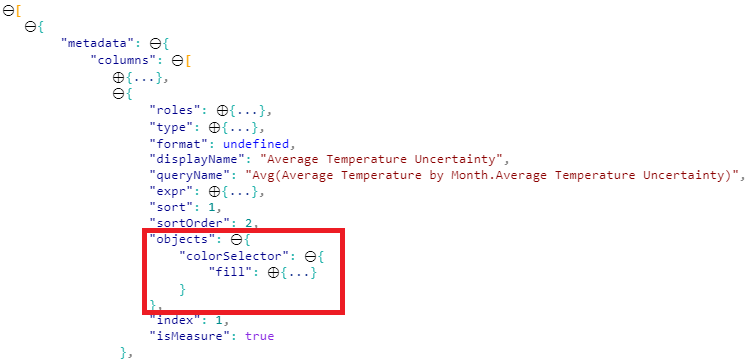
You should be able to make out the queryName property from this screenshot too.
This should then get persisted into your object enumeration, e.g.:

Hopefully this is enough to get you moving; if not, you might need to share some code so we can have a look at specifics.
Good luck!
Daniel
Did I answer your question? Mark my post as a solution!
Proud to be a Super User!
On how to ask a technical question, if you really want an answer (courtesy of SQLBI)


- Mark as New
- Bookmark
- Subscribe
- Mute
- Subscribe to RSS Feed
- Permalink
- Report Inappropriate Content
Hi,
Did you manage to resolve this issue? I am having the same problem and can't figure out how to read the measure colors
Thanks
Nishant
- Mark as New
- Bookmark
- Subscribe
- Mute
- Subscribe to RSS Feed
- Permalink
- Report Inappropriate Content
With measures, I've only got it to work by using the queryName property from the measure DataViewMetadataColumn. If you use this rather than getSelector() against a SelectionId it should push it into the data view correctly.
If done right, you should see an objects key underneath your column in the metadata, e.g.:
You should be able to make out the queryName property from this screenshot too.
This should then get persisted into your object enumeration, e.g.:
Hopefully this is enough to get you moving; if not, you might need to share some code so we can have a look at specifics.
Good luck!
Daniel
Did I answer your question? Mark my post as a solution!
Proud to be a Super User!
On how to ask a technical question, if you really want an answer (courtesy of SQLBI)

Helpful resources

FabCon & SQLCon – Barcelona 2026
Join us in Barcelona for FabCon and SQLCon, the Fabric, Power BI, SQL, and AI community event. Save €200 with code FABCMTY200.

Data Days 2026
Join Data Days 2026: 60 days of free live/on-demand sessions, challenges, study groups, and certification opportunities.

Power BI DataViz World Championships - June 2026
A new Power BI DataViz World Championship is coming this June! Don't miss out on submitting your entry.

| User | Count |
|---|---|
| 2 | |
| 2 | |
| 1 | |
| 1 | |
| 1 |


| User | Count |
|---|---|
| 4 | |
| 3 | |
| 2 | |
| 2 | |
| 1 |


