
cancel
Showing results for 
Search instead for 
Did you mean: 

Learn from the best! Meet the four finalists headed to the FINALS of the Power BI Dataviz World Championships! Register now

Reply
Anonymous
Not applicable

Connecting to web api

Hi 

I am very new to using Power bi, so this might be a very basic question, but hope someone can help me. 

Until now I have only created dashboards based on data from our local server. However now I would like to connect to data from one of our online services.


They have provided the following:

https://speca.io/SimonOnlinePOS/external-api-v2?key=41502b8375f30e56b210877ef797b7e4

How would I easiest set a connect up? I have look though the many connects in Power bi, but only got more confused. So maybe someone, could guide me on where to start 😊


Cheers

Jesper Miles

5 REPLIES 5
Jayendran
Solution Sage
Solution Sage

Hi @Anonymous 


You can use the Web Connector


let
    Source = Json.Document(Web.Contents("http://https://speca.io/SimonOnlinePOS/external-api-v2"))
in
    Source

https://docs.microsoft.com/en-us/power-bi/desktop-tutorial-importing-and-analyzing-data-from-a-web-page


https://stackoverflow.com/questions/36685463/how-to-connect-my-web-api-wtih-power-bi-reports

Anonymous
Not applicable

Thansk Jayendran!


I have been provieded with a token form the web service, where does that fit in ?


If you open the link, then i though i shoul build a Url like this: 


Web.Contents("https://api.onlinepos.dk/api/getCardsList/{debtor}/{type}/{offset}")


Hi @Anonymous 


As @SteveCampbell  mentioned you can pass the token in the Headers,

In Power Query this will be like

Web.Contents("https://api.powerbi.com/v2.0/",[Headers=[Authorization=Bearer 412sdsx1....]])

Making much simpler you can also provide your query parameters lilke the below

Web.Contents(
    "https://data.gov.uk/api", 
    [
        RelativePath="3/action/package_search", 
        Query=
        [
            q="cows", 
            rows="20"
        ]
    ]
)

Some References:

https://blog.crossjoin.co.uk/2016/08/16/using-the-relativepath-and-query-options-with-web-contents-in-power-query-and-power-bi-m-code/

https://eriksvensen.wordpress.com/2014/09/15/specifying-json-query-in-power-query-example-statistics-sweden/

https://blog.crossjoin.co.uk/2014/03/26/working-with-web-services-in-power-query/

Hi @Anonymous ,


Do you have any update ? If you solved your problem, please accept the answer so that it will help other community members

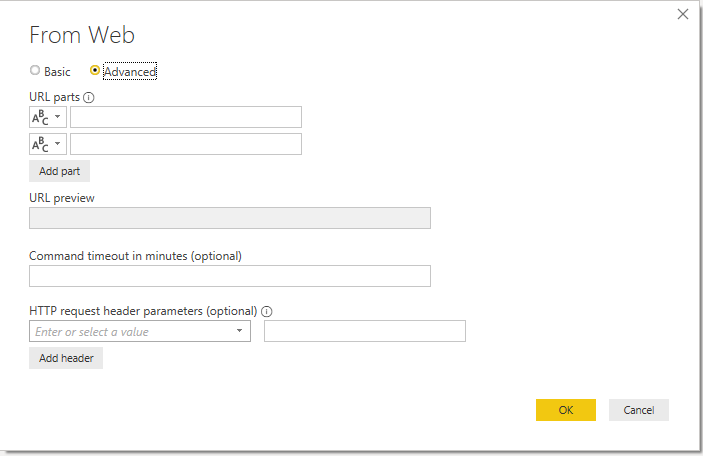
If you go Get Data > Web Contents, you have the option of "Advanced".

This will allow you to apply Headers


Annotation 2019-08-26 161351.png


Love hearing about Power BI tips, jobs and news?
I love to share about these - connect with me!

Stay up to date on  linkedin-logo.png
Read my blogs on  powerbi.tips_.png

Remember to spread knowledge in the community when you can! tu.png


Did I answer your question? Mark my post as a solution! Proud to be a Super User!


Connect with me!
Stay up to date on  
Read my blogs on  


Helpful resources

Announcements
Join our Fabric User Panel

Join our Fabric User Panel

Share feedback directly with Fabric product managers, participate in targeted research studies and influence the Fabric roadmap.

March Power BI Update Carousel

Power BI Community Update - March 2026

Check out the March 2026 Power BI update to learn about new features.