
cancel
Showing results for 
Search instead for 
Did you mean: 

July 7 - July 17 | Round 2 of the Power BI Dataviz World Championships. Don't miss your chance! Learn more

Reply
Anonymous
Not applicable

Connecting to web api

Hi 

I am very new to using Power bi, so this might be a very basic question, but hope someone can help me. 

Until now I have only created dashboards based on data from our local server. However now I would like to connect to data from one of our online services.


They have provided the following:

https://speca.io/SimonOnlinePOS/external-api-v2?key=41502b8375f30e56b210877ef797b7e4

How would I easiest set a connect up? I have look though the many connects in Power bi, but only got more confused. So maybe someone, could guide me on where to start 😊


Cheers

Jesper Miles

5 REPLIES 5
Jayendran
Solution Sage
Solution Sage

Hi @Anonymous 


You can use the Web Connector


let
    Source = Json.Document(Web.Contents("http://https://speca.io/SimonOnlinePOS/external-api-v2"))
in
    Source

https://docs.microsoft.com/en-us/power-bi/desktop-tutorial-importing-and-analyzing-data-from-a-web-p...


https://stackoverflow.com/questions/36685463/how-to-connect-my-web-api-wtih-power-bi-reports

Anonymous
Not applicable

Thansk Jayendran!


I have been provieded with a token form the web service, where does that fit in ?


If you open the link, then i though i shoul build a Url like this: 


Web.Contents("https://api.onlinepos.dk/api/getCardsList/{debtor}/{type}/{offset}")


Hi @Anonymous 


As @SteveCampbell  mentioned you can pass the token in the Headers,

In Power Query this will be like

Web.Contents("https://api.powerbi.com/v2.0/",[Headers=[Authorization=Bearer 412sdsx1....]])

Making much simpler you can also provide your query parameters lilke the below

Web.Contents(
    "https://data.gov.uk/api", 
    [
        RelativePath="3/action/package_search", 
        Query=
        [
            q="cows", 
            rows="20"
        ]
    ]
)

Some References:

https://blog.crossjoin.co.uk/2016/08/16/using-the-relativepath-and-query-options-with-web-contents-i...

https://eriksvensen.wordpress.com/2014/09/15/specifying-json-query-in-power-query-example-statistics...

https://blog.crossjoin.co.uk/2014/03/26/working-with-web-services-in-power-query/

Hi @Anonymous ,


Do you have any update ? If you solved your problem, please accept the answer so that it will help other community members

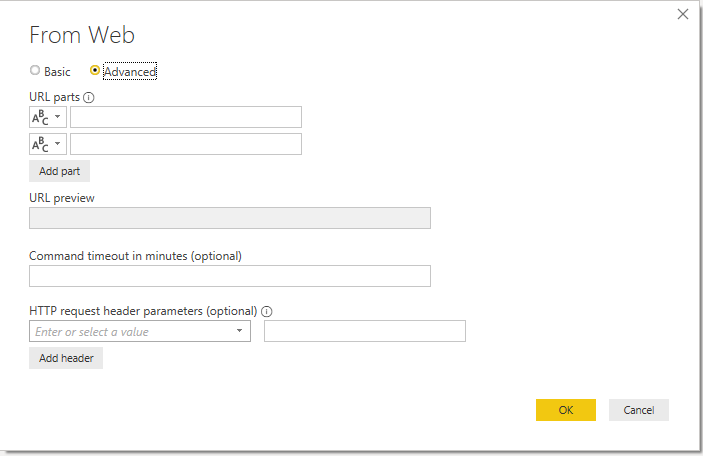
If you go Get Data > Web Contents, you have the option of "Advanced".

This will allow you to apply Headers


Annotation 2019-08-26 161351.png


Love hearing about Power BI tips, jobs and news?
I love to share about these - connect with me!

Stay up to date on  linkedin-logo.png
Read my blogs on  powerbi.tips_.png

Remember to spread knowledge in the community when you can! tu.png


Did I answer your question? Mark my post as a solution! Proud to be a Super User!


Connect with me!
Stay up to date on  
Read my blogs on  


Helpful resources

Announcements
FabCon and SQLCon Barcelona 2026

FabCon & SQLCon – Barcelona 2026

Join us in Barcelona for FabCon and SQLCon, the Fabric, Power BI, SQL, and AI community event. Save €200 with code FABCMTY200.

60 days of Data Days Carousel

Data Days 2026

Join Fabric Data Days 2026: 60 days of free live/on-demand sessions, challenges, study groups, and certification opportunities.

Power BI DataViz World Championships carousel

Power BI DataViz World Championships - June 2026

A new Power BI DataViz World Championship is coming this June! Don't miss out on submitting your entry.