cancel
Showing results for 
Search instead for 
Did you mean: 

The FabCon + SQLCon recap series starts April 14th at 8am Pacific. If you’re tracking where AI is going inside Fabric, this first session is a can't miss. Register now

Reply
Anonymous
Not applicable

Connect PowerBI REST API (PowerBIPS)

Hi,

This my first time trying to configure PowerBI REST API and I'm having some problems to connect.

I'm trying to use PowerBIPS. (https://ruiromanoblog.wordpress.com/tag/powerbips/)

https://github.com/DevScope/powerbi-powershell-modules/blob/master/Modules/PowerBIPS/PowerBIPS.md


- I created an an App at https://dev.powerbi.com/apps as Server-side web application (don't know what configure in url; we use PowerBI Online)

- I got my client_id and secret_id

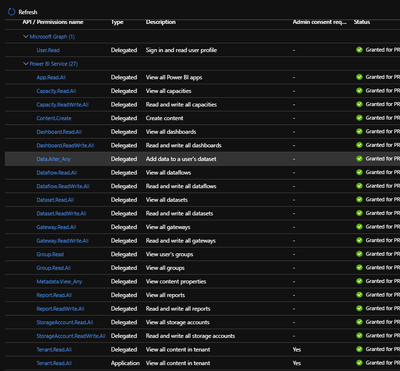
- I gave all the permissions
 

2020-07-22_17h20_54.png
When I try to run: 


Install-Module -Name PowerBIPS

#PBI-PowerBIPS
$tenantId = "ab96XXXX-XXXX-XXXX-XXXX-XXXXda9ada1"
$clientId = "b3d7XXXX-XXXX-XXXX-XXXX-XXXX160e0f4" 
$clientSecret = "_Jti.XXXX-XXXXfCfG"
#url: http://localhost:1234/resirect.aspx

$authToken = Get-PBIAuthToken -clientId $clientId -clientSecret $clientSecret -tenantId $tenantId

$reports = Get-PBIReport -authToken $authToken -groupId "8e921e7f-50d5-4068-88bc-157a0f1a62ec" -Verbose


I get the error:


VERBOSE: Getting Reports
VERBOSE: GET https://api.powerbi.com/v1.0/myorg/groups/50224abf-8c80-4644-88e4-e3f38078245b/reports with 0-byte payload
Invoke-PBIRequest : The remote server returned an error: (401) Unauthorized. - ''
At C:\Program Files\WindowsPowerShell\Modules\PowerBIPS\2.0.4.2\PowerBIPS.psm1:621 char:16
+ ... reports = @(Invoke-PBIRequest -authToken $authToken -method Get -reso ...
+                 ~~~~~~~~~~~~~~~~~~~~~~~~~~~~~~~~~~~~~~~~~~~~~~~~~~~~~~~~~
    + CategoryInfo          : NotSpecified: (:) [Write-Error], WebException
    + FullyQualifiedErrorId : System.Net.WebException,Invoke-PBIRequest
VERBOSE: Found 0 reports.


What I'm missing?


I even tried to follow this setps: https://docs.microsoft.com/en-us/power-bi/developer/embedded/embed-service-principal

But I couldn't do step 4. Shows different.

In workspace members if I search for the App, showes nothing.


I really need your help.

Please, try explain with details, because really don't understand any of this.

Thanks

5 REPLIES 5
lbendlin
Super User
Super User

What's your reasoning for using PowerBIPS ?  Would you be willing to run native Powershell instead?


This thread has most fo the details.

https://community.powerbi.com/t5/Service/Power-BI-REST-API-gives-403-error/m-p/1232096#M102893

Anonymous
Not applicable

Thanks @lbendlin.

We publish 5-6 reports per week. To do this we have to open pbix file in PowerBI Desktop, in datasource change staging sql server to production sql server, and do the same to login and password. 

I want to automate this. After a search in google found that PowerBIPS allows me to do this.

Do you have any other suggestion to make this?

There are multiple options:


The standard InvokeRestApiCall commands can do the same. 

You can use data source parameters on the service

Deployment Pipelines may be an alternative if you are on Premium. 

Also look into ALMToolkit.

Anonymous
Not applicable

Any examples on how can I use any of this options?

Thanks.

The standard InvokeRestApiCall commands can do the same. 

https://community.powerbi.com/t5/Service/Power-BI-REST-API-gives-403-error/m-p/1232096#M102893


You can use data source parameters on the service

https://docs.microsoft.com/en-us/power-bi/connect-data/service-parameters


Deployment Pipelines may be an alternative if you are on Premium. 

https://powerbi.microsoft.com/en-us/blog/introducing-power-bi-deployment-pipelines-preview/


Also look into ALMToolkit.

http://alm-toolkit.com/

Helpful resources

Announcements
New to Fabric survey Carousel

New to Fabric Survey

If you have recently started exploring Fabric, we'd love to hear how it's going. Your feedback can help with product improvements.

Power BI DataViz World Championships carousel

Power BI DataViz World Championships - June 2026

A new Power BI DataViz World Championship is coming this June! Don't miss out on submitting your entry.

Join our Fabric User Panel

Join our Fabric User Panel

Share feedback directly with Fabric product managers, participate in targeted research studies and influence the Fabric roadmap.

March Power BI Update Carousel

Power BI Community Update - March 2026

Check out the March 2026 Power BI update to learn about new features.