Get certified for free when you join Fabric Data Days 2026 and dive into Fabric, Power BI, SQL, AI, and other essential data skills.
Join nowJuly 7 - July 17 | Round 2 of the Power BI Dataviz World Championships. Don't miss your chance! Learn more
Hello,
I want to combine multiple excel files into one database.
Every day I get 1 new excel file in the same format but different data and put it into the same folder.
I used the tutorial on youtube: https://www.youtube.com/watch?v=a7E29H5ZUmE
It's understandable and works with test data but not for my excel files
In this tutorial the first row is the header and that's my problem.
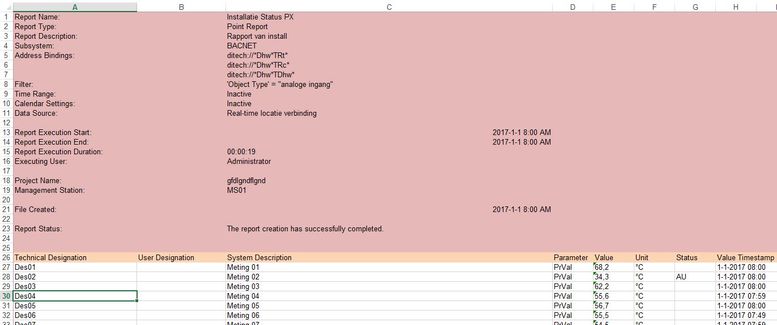
The first 25 rows (red) from each excel file must be deleted.
Row 26 (orange) is the header and after row 26 the data.
I can change this by hand each time but it must be automated (way of working now!).
How can this problem be fixed en delete those 25 first rows from each excel file and combine it into one database.
Kind regards,
Mark
Solved! Go to Solution.
In the Query Editor, Home tab, use the Reduce Rows menu, Remove Rows button to select "Remove Top N Rows". Set it for 25 and it should remove those rows automatically for you when it does the data import.
@Anonymous,
For more complex task, do research into The Advanced Editor.
@Anonymous,
For more complex task, do research into The Advanced Editor.
In the Query Editor, Home tab, use the Reduce Rows menu, Remove Rows button to select "Remove Top N Rows". Set it for 25 and it should remove those rows automatically for you when it does the data import.
Join us in Barcelona for FabCon and SQLCon, the Fabric, Power BI, SQL, and AI community event. Save €200 with code FABCMTY200.
Join Data Days 2026: 60 days of free live/on-demand sessions, challenges, study groups, and certification opportunities.
| User | Count |
|---|---|
| 2 | |
| 1 | |
| 1 | |
| 1 | |
| 1 |
| User | Count |
|---|---|
| 5 | |
| 3 | |
| 3 | |
| 2 | |
| 2 |