This is best Fabric, Power BI, SQL and AI community event. How do we know? The last event sold out! Save €200 with code FABCMTY200.
Register nowA new Data Days event is coming soon! This time we’re going bigger than ever. Fabric, Power BI, SQL, AI and more. Don't miss out.
Hello,
I want to combine multiple excel files into one database.
Every day I get 1 new excel file in the same format but different data and put it into the same folder.
I used the tutorial on youtube: https://www.youtube.com/watch?v=a7E29H5ZUmE
It's understandable and works with test data but not for my excel files
In this tutorial the first row is the header and that's my problem.
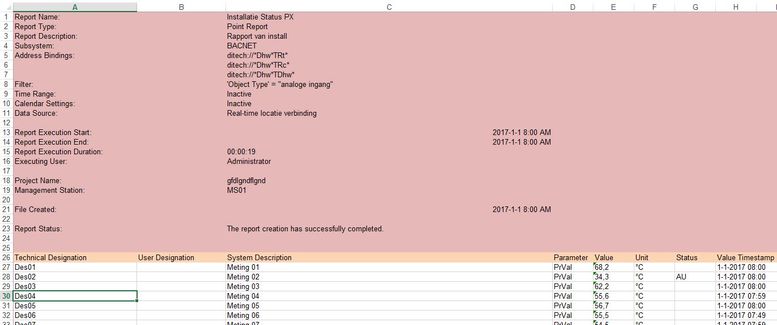
The first 25 rows (red) from each excel file must be deleted.
Row 26 (orange) is the header and after row 26 the data.
I can change this by hand each time but it must be automated (way of working now!).
How can this problem be fixed en delete those 25 first rows from each excel file and combine it into one database.
Kind regards,
Mark
Solved! Go to Solution.
In the Query Editor, Home tab, use the Reduce Rows menu, Remove Rows button to select "Remove Top N Rows". Set it for 25 and it should remove those rows automatically for you when it does the data import.
@Anonymous,
For more complex task, do research into The Advanced Editor.
@Anonymous,
For more complex task, do research into The Advanced Editor.
In the Query Editor, Home tab, use the Reduce Rows menu, Remove Rows button to select "Remove Top N Rows". Set it for 25 and it should remove those rows automatically for you when it does the data import.
Sign up to receive a private message when registration opens and key events begin.
If you have recently started exploring Fabric, we'd love to hear how it's going. Your feedback can help with product improvements.
| User | Count |
|---|---|
| 3 | |
| 1 | |
| 1 | |
| 1 | |
| 1 |