Join us at FabCon Atlanta from March 16 - 20, 2026, for the ultimate Fabric, Power BI, AI and SQL community-led event. Save $200 with code FABCOMM.
Register now!The Power BI Data Visualization World Championships is back! Get ahead of the game and start preparing now! Learn more
Hi all,
I need to use the value of a measure as input for another calculation and I woulld like to convert it to a column.
When I assign New Column=[Measure] is not working. Any idea how i can assign the value of the measure to a one-row column(single value)?
Thanks,
Elria
measures are influenced by the filter context. Columns live in a row context. They are not compatible.
Explain what you are actually trying to achieve.
Hi @lbendlin,
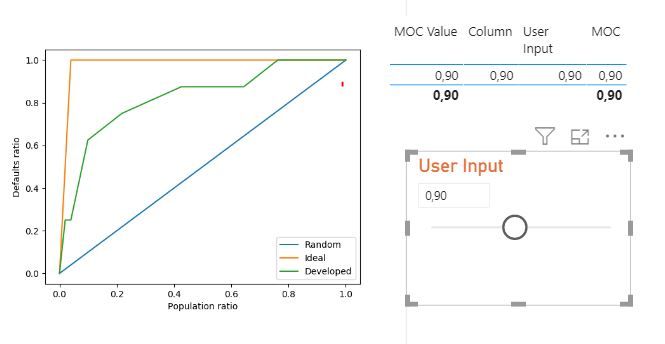
Thanks for your reply. I need to pass a what-if parameter (single numeric value) in a python script where this value is used as variable in a function. I tried to pass the measure[value] itself but then i get the error in my python visual that there is too much data and to apply any filter/slicer. This is not the case when i remove the measure from the dataset though. My data is not that much.
Please check below some pictures. "User Input" is a waht-if parameter, which i would like to pass in my script.
The porblem is that currently the Column comes from the same table is the What-iF value (Column=Measure[Value]) but I would like to create such a column in my dataset where columns A and B live in order to call it in python. The What-if table though doesnt have any relationship with my main table.
User Input = GENERATESERIES(0, 2, 0.1)
The Power BI Data Visualization World Championships is back! Get ahead of the game and start preparing now!
| User | Count |
|---|---|
| 3 | |
| 2 | |
| 2 | |
| 1 | |
| 1 |
| User | Count |
|---|---|
| 11 | |
| 7 | |
| 4 | |
| 4 | |
| 3 |