Get certified for free when you join Fabric Data Days 2026 and dive into Fabric, Power BI, SQL, AI, and other essential data skills.
Join nowJuly 28 - August 9 | Final Round of the Power BI Dataviz World Championships. This is your chance. Learn more
Hi all,
I need to use the value of a measure as input for another calculation and I woulld like to convert it to a column.
When I assign New Column=[Measure] is not working. Any idea how i can assign the value of the measure to a one-row column(single value)?
Thanks,
Elria
measures are influenced by the filter context. Columns live in a row context. They are not compatible.
Explain what you are actually trying to achieve.
Hi @lbendlin,
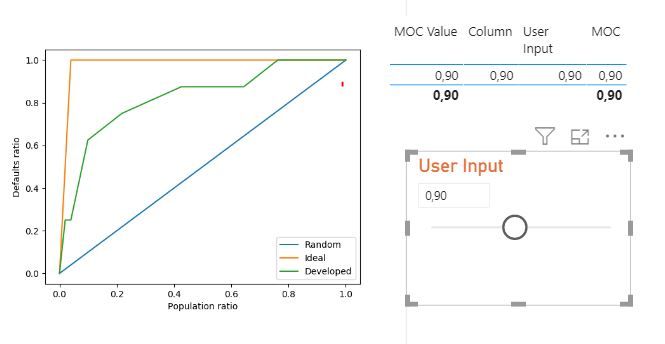
Thanks for your reply. I need to pass a what-if parameter (single numeric value) in a python script where this value is used as variable in a function. I tried to pass the measure[value] itself but then i get the error in my python visual that there is too much data and to apply any filter/slicer. This is not the case when i remove the measure from the dataset though. My data is not that much.
Please check below some pictures. "User Input" is a waht-if parameter, which i would like to pass in my script.
The porblem is that currently the Column comes from the same table is the What-iF value (Column=Measure[Value]) but I would like to create such a column in my dataset where columns A and B live in order to call it in python. The What-if table though doesnt have any relationship with my main table.
User Input = GENERATESERIES(0, 2, 0.1)
Join us in Barcelona for FabCon and SQLCon, the Fabric, Power BI, SQL, and AI community event. Save €200 with code FABCMTY200.
If you love stickers, then you will definitely want to check out our community sticker challenge, Barcelona edition!
Check out the July 2026 Power BI update to learn about new features.
| User | Count |
|---|---|
| 2 | |
| 1 | |
| 1 | |
| 1 | |
| 1 |
| User | Count |
|---|---|
| 4 | |
| 2 | |
| 1 | |
| 1 | |
| 1 |