Share feedback directly with Fabric product managers, participate in targeted research studies and influence the Fabric roadmap.
Sign up nowGet Fabric certified for FREE! Don't miss your chance! Learn more
Good morning / afternoon / evening
Would anyone be able to list the precise steps I need to perform in order to fire off a HTTP request to the Power BI api from within an azure logic app?
I have been attempting to follow the articles below:
https://carldesouza.com/how-to-register-an-azure-app-to-use-with-power-bi/
https://carldesouza.com/how-to-authenticate-and-use-the-power-bi-api-inside-power-automate/
To date, I haven't even got as far as to getting the access token and I am finding it rather infuriating!
Currently, I am stuck with the following error:
Hi @MrRichDean,
what kind of Power BI Rest API request are you using? If you want to use Admin API's with application your application has to have API permissions without Admin consent required option.
Instead of Yes in my picture you should have No.
the error message is pretty accurate. You first need to register the app, and make sure to specify the correct desired permission scope. Then your admin needs to agree to that app request. Then you can use the app's authentication method to run your Power BI API calls.
Hello @lbendlin
Could you explain what you mean regarding the correct desired permission scope? How does my admin agree to the app request? Am I even correct in that I need to get an access token before calling the Power BI API ?
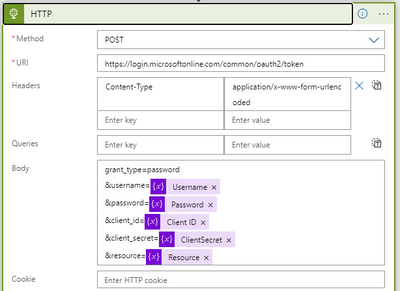
Currently I am doing the following call to get the access token :
MY admin believes they have agreed to eveything he can find - what are they missing?!
If you love stickers, then you will definitely want to check out our Community Sticker Challenge!
Check out the January 2026 Power BI update to learn about new features.
| User | Count |
|---|---|
| 3 | |
| 2 | |
| 2 | |
| 1 | |
| 1 |
| User | Count |
|---|---|
| 5 | |
| 4 | |
| 3 | |
| 3 | |
| 2 |