Join us at FabCon Atlanta from March 16 - 20, 2026, for the ultimate Fabric, Power BI, AI and SQL community-led event. Save $200 with code FABCOMM.
Register now!The Power BI Data Visualization World Championships is back! Get ahead of the game and start preparing now! Learn more
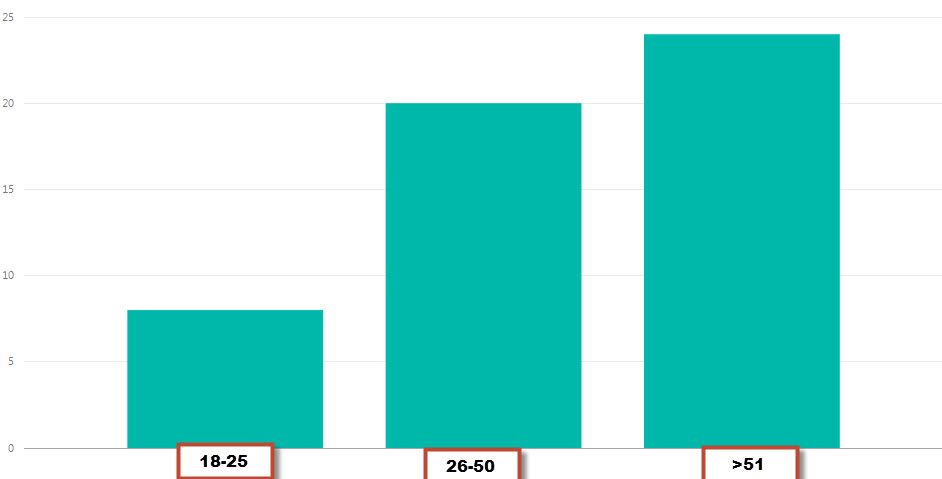
We got requirement to show the users count with age distributions. For example we have to show the users count by age between breakups . X axis values should be : 18-35 , 36-50,51-64, 65>above. Y axis : users count. Please suggest us how to calculate users count based on age breakups ?
Solved! Go to Solution.
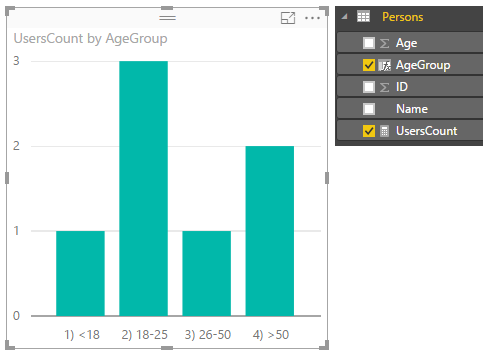
Here is one way for your reference.
1) add a caculated column AgeGroup
AgeGroup =
IF (
Persons[Age] < 18,
"1) <18",
IF (
Persons[Age] <= 25,
"2) 18-25",
IF ( Persons[Age] <= 50, "3) 26-50", "4) >50" )
)
)2) add a measure UsersCount
UsersCount = COUNTX ( Persons, 1 )
Here is one way for your reference.
1) add a caculated column AgeGroup
AgeGroup =
IF (
Persons[Age] < 18,
"1) <18",
IF (
Persons[Age] <= 25,
"2) 18-25",
IF ( Persons[Age] <= 50, "3) 26-50", "4) >50" )
)
)2) add a measure UsersCount
UsersCount = COUNTX ( Persons, 1 )
Thanks Sam,
I have found one more solutoin, We can able add conditions by using Conditional Column feature in query editor.
Check out the November 2025 Power BI update to learn about new features.
Advance your Data & AI career with 50 days of live learning, contests, hands-on challenges, study groups & certifications and more!
| User | Count |
|---|---|
| 4 | |
| 2 | |
| 2 | |
| 1 | |
| 1 |
| User | Count |
|---|---|
| 10 | |
| 10 | |
| 4 | |
| 3 | |
| 3 |