cancel
Showing results for 
Search instead for 
Did you mean: 

Learn from the best! Meet the four finalists headed to the FINALS of the Power BI Dataviz World Championships! Register now

Reply
Anonymous
Not applicable

Azure Synapse reading csv file

Referring to Youtube video (https://www.youtube.com/watch?v=vOSzw40TohM) and attempting to utilze a csv file uploaded to Azure Blob/Gen2 datalake, and execute a SQL Script against a CSV file. Attempted many combinations to query but only returns the filename.


base query

SELECT
    TOP100 *
FROM
    OPENROWSET(
        FORMAT = 'CSV',
        FIELDTERMINATOR = ';',
        ROWTERMINATOR = '',
        PARSER_VERSION='2.0'
    ) AS [result]
 
Tried defining all the columns, data types, and data row start which should return 6 columns with 100k rows of data.
2 REPLIES 2
Anonymous
Not applicable

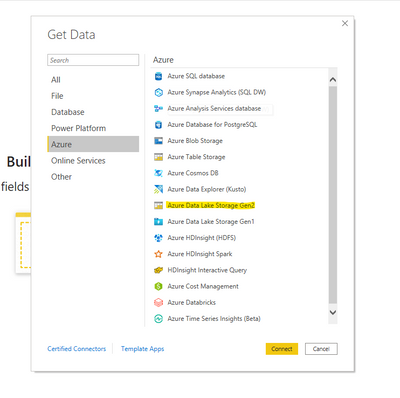
You can try to directly connect to this csv file from within Power BI. Open Power BI -> Get Data -> Azure -> Azure Data Lake Storage Gen 2 -> Put the URL of the CSV and then sign in. This should be the easiest and most straight forward way.

gdarakji_0-1621180680576.png


v-lionel-msft
Community Support
Community Support

Hi @Anonymous ,


OPENROWSET (Transact-SQL) - SQL Server | Microsoft Docs

Please refer to the link.


Best regards,
Lionel Chen

If this post helps, then please consider Accept it as the solution to help the other members find it more quickly.

Helpful resources

Announcements
Join our Fabric User Panel

Join our Fabric User Panel

Share feedback directly with Fabric product managers, participate in targeted research studies and influence the Fabric roadmap.

February Power BI Update Carousel

Power BI Monthly Update - February 2026

Check out the February 2026 Power BI update to learn about new features.

FabCon Atlanta 2026 carousel

FabCon Atlanta 2026

Join us at FabCon Atlanta, March 16-20, for the ultimate Fabric, Power BI, AI and SQL community-led event. Save $200 with code FABCOMM.