This time we’re going bigger than ever. Fabric, Power BI, SQL, AI and more. We're covering it all. You won't want to miss it.
Learn moreDid you hear? There's a new SQL AI Developer certification (DP-800). Start preparing now and be one of the first to get certified. Register now
Referring to Youtube video (https://www.youtube.com/watch?v=vOSzw40TohM) and attempting to utilze a csv file uploaded to Azure Blob/Gen2 datalake, and execute a SQL Script against a CSV file. Attempted many combinations to query but only returns the filename.
base query
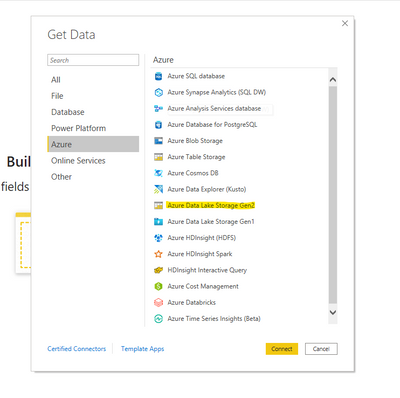
You can try to directly connect to this csv file from within Power BI. Open Power BI -> Get Data -> Azure -> Azure Data Lake Storage Gen 2 -> Put the URL of the CSV and then sign in. This should be the easiest and most straight forward way.
Hi @Anonymous ,
OPENROWSET (Transact-SQL) - SQL Server | Microsoft Docs
Please refer to the link.
Best regards,
Lionel Chen
If this post helps, then please consider Accept it as the solution to help the other members find it more quickly.
Check out the April 2026 Power BI update to learn about new features.
If you have recently started exploring Fabric, we'd love to hear how it's going. Your feedback can help with product improvements.
A new Power BI DataViz World Championship is coming this June! Don't miss out on submitting your entry.
| User | Count |
|---|---|
| 4 | |
| 2 | |
| 1 | |
| 1 | |
| 1 |