cancel
Showing results for 
Search instead for 
Did you mean: 

Get Fabric certified for FREE! Don't miss your chance! Learn more

Reply
xli629b
Helper II
Helper II

Adding Azure B2B Direct Connect users to workspaces

I am trying to add an external service principal (from another tenant) that is enabled to access our tenancy with B2B Direct Connect to my workspace.

After enabling inbound and outbound access for this service principal in External Identities > B2B direct connect, I was able to authenticate into my tenancy with the external service principal to access the API.

However, now I need to give the external service principal access to a workspace.

Adding it manually: In the Access tab of my workspace, I can't find the external service principal in the autocomplete.

Adding it via the API: I get the following when I try to add the service principal's object ID.
https://api.powerbi.com/v1.0/myorg/groups/<groupId>/users

{
  groupUserAccessRight: "Admin",
  identifier: "<object ID for service principal>",
  principalType: "App"
}

Response:

{
  "error": {
    "code": "InvalidRequest",
    "message": "Failed to get service principal details from AAD."
  }
}

 
Is it possible to use the Power BI REST API with external users with B2B Direct Connect, or is there no way for Power BI to work with users that are in another tenant's directory altogether (rather than guest users).

3 REPLIES 3
Anonymous
Not applicable

HI @xli629b,

I think you need to create a security group with common users and b2b users at first, then you can add the service principal to that security group.
After these steps, you can assign the above group as a member of the workspace that stores embedded contents to share the premissions.

Embed Power BI content in an embedded analytics application with service principal and an applicatio...

Regards,

Xiaoxin Sheng

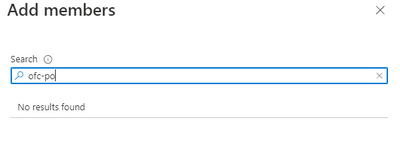
I created a security group, but when I try to add the external B2B Direct Connect service principal to the group, it cannot be found either by object ID or by name.

xli629b_0-1649343194820.png


Anonymous
Not applicable

HI @xli629b,

I'm not so sure if this scenario is related to the limitation of b2b feature usages, perhaps you can contact azure support to confirm this.
reference link:

Azure Support Options | Microsoft Azure

Distribute content to external guest users with Azure AD B2B - Power BI | Microsoft Docs

Regards,

Xiaoxin Sheng

Helpful resources

Announcements
Join our Fabric User Panel

Join our Fabric User Panel

Share feedback directly with Fabric product managers, participate in targeted research studies and influence the Fabric roadmap.

Sticker Challenge 2026 Carousel

Join our Community Sticker Challenge 2026

If you love stickers, then you will definitely want to check out our Community Sticker Challenge!

January Power BI Update Carousel

Power BI Monthly Update - January 2026

Check out the January 2026 Power BI update to learn about new features.

FabCon Atlanta 2026 carousel

FabCon Atlanta 2026

Join us at FabCon Atlanta, March 16-20, for the ultimate Fabric, Power BI, AI and SQL community-led event. Save $200 with code FABCOMM.