This is best Fabric, Power BI, SQL and AI community event. How do we know? The last event sold out! Save €200 with code FABCMTY200.
Register nowA new Data Days event is coming soon! This time we’re going bigger than ever. Fabric, Power BI, SQL, AI and more. Don't miss out.
Could someone please advise me where I may be going wrong here. I am attempting to create a sample dataset after retrieving what I believe to be a correct access token after prompting the end-user to login using the following URL:
https://login.windows.net/common/oauth2/authorize?response_type=code&client_id={client_app_id}&resource=https://analysis.windows.net/powerbi/api&redirect_uri={my_redirect_uri}To create the sample dataset I used the following URL:
POST https://api.powerbi.com/v1.0/myorg/datasets
with the headers:
{
"Authorization" => "Bearer {auth_code}",
"Content-Type" => "application/json"
}and the body:
"{\"name\":\"SalesMarketing\",\"tables\":[{\"name\":\"Product\",\"columns\":[{\"name\":\"ProductID\",\"dataType\":\"int\"},{\"name\":\"Manufacturer\",\"dataType\":\"string\"},{\"name\":\"Category\",\"dataType\":\"string\"},{\"name\":\"Segment\",\"dataType\":\"string\"},{\"name\":\"Product\",\"dataType\":\"string\"},{\"name\":\"IsCompete\",\"dataType\":\"bool\"}]}]}"but when I send the request, all I receive is a 403 error with no message.
Any suggestions?
Many Thanks,
Carl
I think you are using the SPN approach, where SPN doesn't have access to Myworkspace. So basically you have use the legacy autentication (username and password)
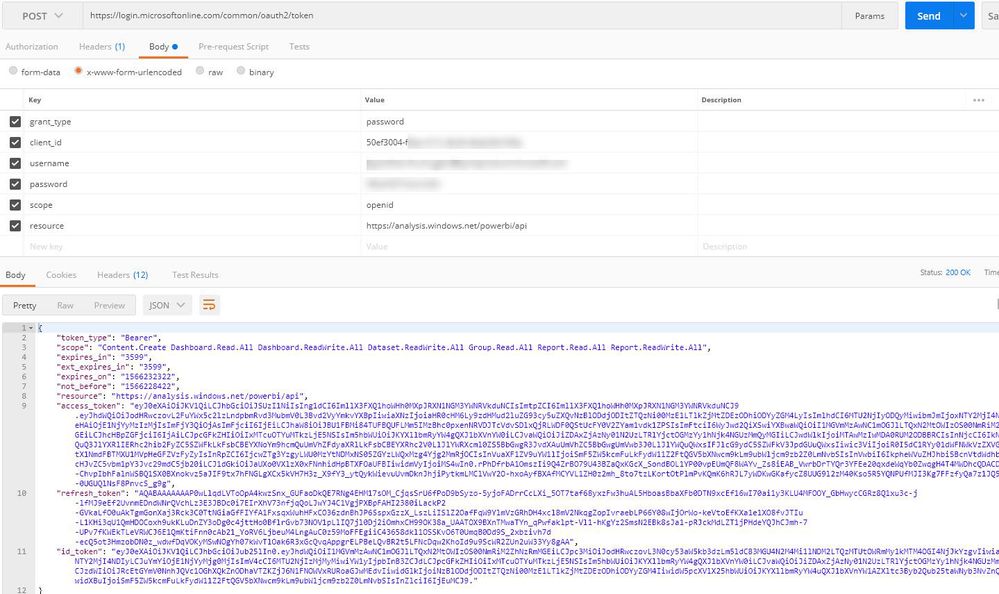
Basically I'm making a request (post) on:
https://login.windows.net/common/oauth2/token
With the Body parameters:
grant_type = password
scope = openid
resource = https: //analysis.windows.net/powerbi/api
client_id = MY_CLIENT_IS
username = MY_USER_NAME
password = MY_PASSWORD
Hi, Jayendran,
I have send a post request that follow up your screenshot but I get an error:"
Thanks @Jayendran,
I don't believe I am able to use this endpoint as my organisation has enabled two-factor authentication unless you're aware of a way to bypass it for this?
This is the error I received:
"error": "interaction_required",
"error_description": "AADSTS50076: Due to a configuration change made by your administrator, or because you moved to a new location, you must use multi-factor authentication to access '00000009-0000-0000-c000-000000000000'.\r\nTrace ID: 83cc52bf-55e5-473e-9c83-92ac9b622200\r\nCorrelation ID: add98fba-18cb-4759-9fa4-f3526aa7341b\r\nTimestamp: 2019-09-25 12:33:35Z",
"error_codes": [
50076
],
Hi @cgreenwood
I don't think you can bypass the MFA ,you have to disable the MFA to work this legacy approach.
Another workaround will be use the same approach you have, but instead of publishing this to Myworkspace try in a different worksapce, like below
https://api.PowerBI.com/v1.0/myorg/groups/{group_id}/datasets
And make sure that SPN have Admin access to that workspace
Check out the May 2026 Power BI update to learn about new features.
Sign up to receive a private message when registration opens and key events begin.
If you have recently started exploring Fabric, we'd love to hear how it's going. Your feedback can help with product improvements.
| User | Count |
|---|---|
| 3 | |
| 1 | |
| 1 | |
| 1 | |
| 1 |