We've captured the moments from FabCon & SQLCon that everyone is talking about, and we are bringing them to the community, live and on-demand. Starts on April 14th. Register now
Hello,
so I'm working on a big report including dates from 2016 and 2017,
for some reason the date hirrarchy mix dates from Q1 2016 and 2017.
I would like to present 5 Quarter, Q1 2016 Q2 2016 Q3 2016 Q4 2016 Q1 2017 - for all times the data is dynamic so the solution should be permanent.
please help
Solved! Go to Solution.
Hi @Noak,
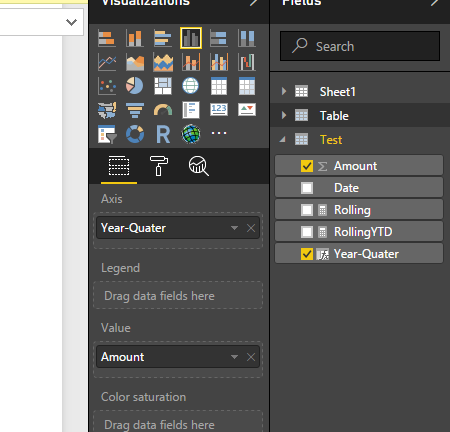
I agree with BetterCallFrank's solution. Below is a sample about how to use it:
1. Add a calculate column to store the "quarter year".
Year-Quarter = CONCATENATE([Date].[Quarter]," "& [Date].[Year])
2. Drag the new column as the axis field and remove the original date column which in your visual.
Regards,
Xiaoxin Sheng
Hi @Noak,
I agree with BetterCallFrank's solution. Below is a sample about how to use it:
1. Add a calculate column to store the "quarter year".
Year-Quarter = CONCATENATE([Date].[Quarter]," "& [Date].[Year])
2. Drag the new column as the axis field and remove the original date column which in your visual.
Regards,
Xiaoxin Sheng
solved i repleased the year with quarter in order to have logic.
Year-Quarter = CONCATENATE( [createdon].[Year]," " & [createdon].[Quarter])
thank you!.
hi @Anonymous
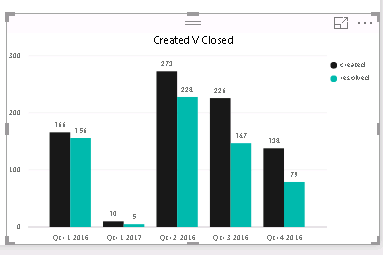
I alreday figured it on my own , problem is the order as you can see:
Q1 -2017 Should be the latest.
you have to add the year from the date hierarchy to X-axis - this will separate q1/16 from q1/17
HTH,
Frank
If you have recently started exploring Fabric, we'd love to hear how it's going. Your feedback can help with product improvements.
A new Power BI DataViz World Championship is coming this June! Don't miss out on submitting your entry.
| User | Count |
|---|---|
| 56 | |
| 40 | |
| 36 | |
| 18 | |
| 18 |
| User | Count |
|---|---|
| 70 | |
| 67 | |
| 38 | |
| 34 | |
| 23 |