This time we’re going bigger than ever. Fabric, Power BI, SQL, AI and more. We're covering it all. You won't want to miss it.
Learn moreLevel up your Power BI skills this month - build one visual each week and tell better stories with data! Get started
Hello,
so I'm working on a big report including dates from 2016 and 2017,
for some reason the date hirrarchy mix dates from Q1 2016 and 2017.
I would like to present 5 Quarter, Q1 2016 Q2 2016 Q3 2016 Q4 2016 Q1 2017 - for all times the data is dynamic so the solution should be permanent.
please help
Solved! Go to Solution.
Hi @Noak,
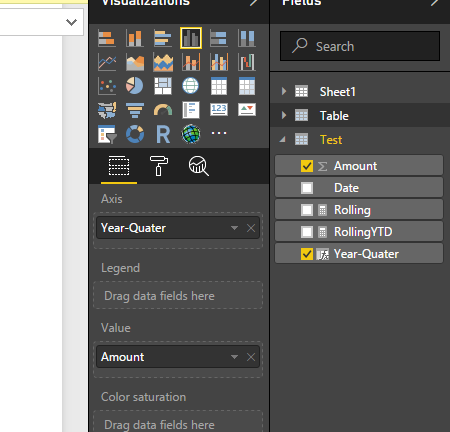
I agree with BetterCallFrank's solution. Below is a sample about how to use it:
1. Add a calculate column to store the "quarter year".
Year-Quarter = CONCATENATE([Date].[Quarter]," "& [Date].[Year])
2. Drag the new column as the axis field and remove the original date column which in your visual.
Regards,
Xiaoxin Sheng
Hi @Noak,
I agree with BetterCallFrank's solution. Below is a sample about how to use it:
1. Add a calculate column to store the "quarter year".
Year-Quarter = CONCATENATE([Date].[Quarter]," "& [Date].[Year])
2. Drag the new column as the axis field and remove the original date column which in your visual.
Regards,
Xiaoxin Sheng
solved i repleased the year with quarter in order to have logic.
Year-Quarter = CONCATENATE( [createdon].[Year]," " & [createdon].[Quarter])
thank you!.
hi @Anonymous
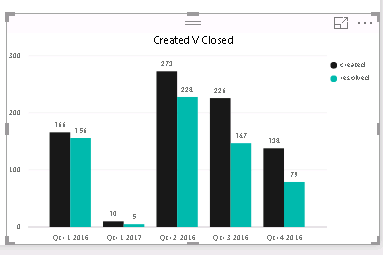
I alreday figured it on my own , problem is the order as you can see:
Q1 -2017 Should be the latest.
you have to add the year from the date hierarchy to X-axis - this will separate q1/16 from q1/17
HTH,
Frank
Check out the April 2026 Power BI update to learn about new features.
Sign up to receive a private message when registration opens and key events begin.
If you have recently started exploring Fabric, we'd love to hear how it's going. Your feedback can help with product improvements.
| User | Count |
|---|---|
| 38 | |
| 28 | |
| 27 | |
| 22 | |
| 18 |
| User | Count |
|---|---|
| 67 | |
| 37 | |
| 32 | |
| 25 | |
| 25 |