
cancel
Showing results for 
Search instead for 
Did you mean: 

A new Data Days event is coming soon! This time we’re going bigger than ever. Fabric, Power BI, SQL, AI and more. Don't miss out.

Reply
hidenseek9
Post Patron
Post Patron

what if parameter

Hello Power BI Community,


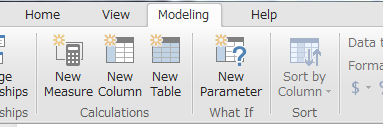
I am using What if Parameter to calculate price in different currency.


2018-02-07 16_35_01-A&P Master Dashboard_v2 - Power BI Desktop.png


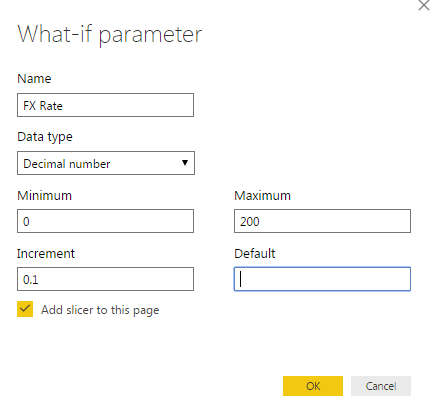
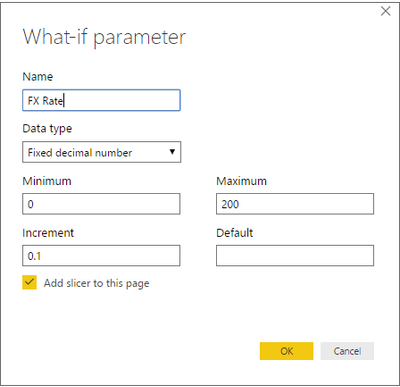
Basically, I am creating a parameter just like below.


2018-02-07 16_36_21-.png


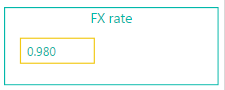
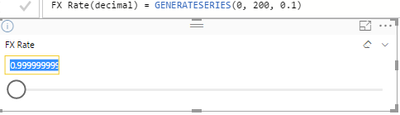
However, when I type in 1 as FX rate, it returns 0.98.

With any other numbers, this parameter is not returning the value I type.

It returns a value close to the value that I typed in.


2018-02-07 16_37_24-A&P Master Dashboard_v2 - Power BI Desktop.png

Any way to fix this problem?


Many thanks,


H

1 ACCEPTED SOLUTION

Hi @hidenseek9


By confirmed by PG, the cause of this issue is that your parameter range is too big. We have a fix that will allow up to 3500 (or maybe even 5000 if perf looks good). Should land in a couple of months. 


Best Regards,

Cherry  

Community Support Team _ Cherry Gao
If this post helps, then please consider Accept it as the solution to help the other members find it more quickly.

View solution in original post

5 REPLIES 5
v-piga-msft
Resident Rockstar
Resident Rockstar

Hi hidenseek9,


Does this issue exist all the pbix file or the single one?

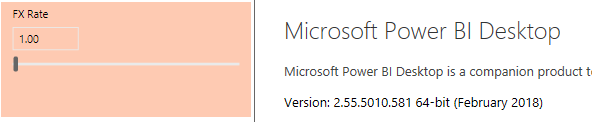
From my tests with two Power BI Versions, the what If parameter works well. Here are the pictures of the test result:

1.PNG

Picture1 is tested on the version February 2018

 Capture.png

 Picture2 is tested on the version January 2018


If your scenario is clicking the number 1, it will appear like this:

2.PNG

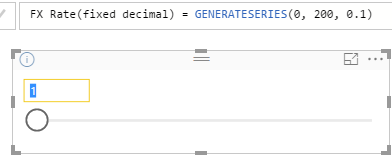
For the workaround, you may try to use the Fixed Decimal number, it will return the number you type in.

 4.PNG3.PNG

You  could also refer to my test pbix file on OneDrive: https://1drv.ms/u/s!AhDc2ZBZkwhXgQDbIr2uqKlq1kqC

Since I cannot reproduce the same issue on my environment.

If  you still cannot fix the issue, could you share a dummy pbix file which can reproduce the issue, so that we can help further investigate on it? You can upload it to OneDrive or Dropbox and post the link here. Do mask sensitive data before uploading.)


Best Regards,

Cherry  

Community Support Team _ Cherry Gao
If this post helps, then please consider Accept it as the solution to help the other members find it more quickly.

@v-piga-msft


Thank you for your response.

Yes it happens with all pbix files unfortunately.


It also happens with your test pbix file as well.

When I select 1.5, it returns 1.4 and when I select 120.8, it returns 120.7.


This means it may not be the problem with just my pbix file,

but a bug at Power BI level??


2018-02-08 15_07_34-what if parameter test.pbix [Read-Only] - Power BI Desktop.png2018-02-08 15_07_22-what if parameter test.pbix [Read-Only] - Power BI Desktop.png


Many thanks,


H

Hi @hidenseek9


By confirmed by PG, the cause of this issue is that your parameter range is too big. We have a fix that will allow up to 3500 (or maybe even 5000 if perf looks good). Should land in a couple of months. 


Best Regards,

Cherry  

Community Support Team _ Cherry Gao
If this post helps, then please consider Accept it as the solution to help the other members find it more quickly.

Hi Cherry

the customer should be aware of the limits.

my one, for example, is trying to use a parameter that spans from 1 to 100k (step 50), 2000 effective values,  and it doesn't work as expected.


the limit is 1000, 3000, 15k or what? can we get any documentation?


thanks

Ariel

@v-piga-msft


Cherry, thank you for this.

I will shorten my range.


Thanks,


H

Helpful resources

Announcements
May Power BI Update Carousel

Power BI Monthly Update - May 2026

Check out the May 2026 Power BI update to learn about new features.

Fabric SQL PBI Data Days

Data Days 2026 coming soon!

Sign up to receive a private message when registration opens and key events begin.

New to Fabric survey Carousel

New to Fabric Survey

If you have recently started exploring Fabric, we'd love to hear how it's going. Your feedback can help with product improvements.

Power BI DataViz World Championships carousel

Power BI DataViz World Championships - June 2026

A new Power BI DataViz World Championship is coming this June! Don't miss out on submitting your entry.