Get certified for free when you join Fabric Data Days 2026 and dive into Fabric, Power BI, SQL, AI, and other essential data skills.
Join nowJuly 7 - July 17 | Round 2 of the Power BI Dataviz World Championships. Don't miss your chance! Learn more
Hi. Is there a functionality that would allow me to move choose a value in a given column by clicking on arrow control buttons?
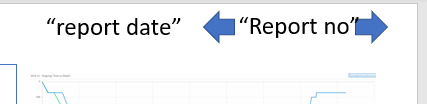
I have two column called report date and Report no. I need to be able to move from the current Report no forth and back. Slicer (list/dropdown list) not very useful in this case because of too many reports to scroll through.
Hi @Anonymous ,
You could use bookmark. Here is a similar case for your reference:
https://community.powerbi.com/t5/Desktop/Button-Filter-Button-trigger-and-filter-values/m-p/658017
@v-eachen-msft if I understood it correctly, one would need pages/visuals for all the reports to navigate through them. In my case arrow buttons would simply perform actions of drop down/list type of slicers.
@Anonymous , refer if these can help
https://www.youtube.com/watch?v=nCEMM6Ryees
https://radacad.com/bookmarks-and-buttons-making-power-bi-charts-even-more-interactive
@amitchandak if I understood it correctly, one would need pages/visuals for all the reports to navigate through them. In my case arrow buttons would simply perform actions of drop down/list slicer.
Hi,
Can you try bookmarks?
Appreciate a Kudos! 🙂
If this helps and resolves the issue, please mark it as a Solution! 🙂
Regards,
N V Durga Prasad
Join us in Barcelona for FabCon and SQLCon, the Fabric, Power BI, SQL, and AI community event. Save €200 with code FABCMTY200.
Join Fabric Data Days 2026: 60 days of free live/on-demand sessions, challenges, study groups, and certification opportunities.
| User | Count |
|---|---|
| 22 | |
| 22 | |
| 18 | |
| 17 | |
| 13 |
| User | Count |
|---|---|
| 63 | |
| 50 | |
| 46 | |
| 41 | |
| 39 |