Join us at FabCon Atlanta from March 16 - 20, 2026, for the ultimate Fabric, Power BI, AI and SQL community-led event. Save $200 with code FABCOMM.
Register now!Vote for your favorite vizzies from the Power BI Dataviz World Championship submissions. Vote now!
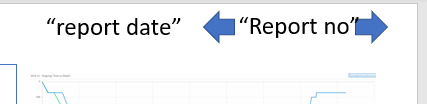
Hi. Is there a functionality that would allow me to move choose a value in a given column by clicking on arrow control buttons?
I have two column called report date and Report no. I need to be able to move from the current Report no forth and back. Slicer (list/dropdown list) not very useful in this case because of too many reports to scroll through.
Hi @Anonymous ,
You could use bookmark. Here is a similar case for your reference:
https://community.powerbi.com/t5/Desktop/Button-Filter-Button-trigger-and-filter-values/m-p/658017
@v-eachen-msft if I understood it correctly, one would need pages/visuals for all the reports to navigate through them. In my case arrow buttons would simply perform actions of drop down/list type of slicers.
@Anonymous , refer if these can help
https://www.youtube.com/watch?v=nCEMM6Ryees
https://radacad.com/bookmarks-and-buttons-making-power-bi-charts-even-more-interactive
@amitchandak if I understood it correctly, one would need pages/visuals for all the reports to navigate through them. In my case arrow buttons would simply perform actions of drop down/list slicer.
Hi,
Can you try bookmarks?
Appreciate a Kudos! 🙂
If this helps and resolves the issue, please mark it as a Solution! 🙂
Regards,
N V Durga Prasad
The Power BI Data Visualization World Championships is back! It's time to submit your entry.
If you love stickers, then you will definitely want to check out our Community Sticker Challenge!
Check out the January 2026 Power BI update to learn about new features.
| User | Count |
|---|---|
| 70 | |
| 55 | |
| 38 | |
| 28 | |
| 22 |
| User | Count |
|---|---|
| 133 | |
| 119 | |
| 54 | |
| 37 | |
| 31 |