cancel
Showing results for 
Search instead for 
Did you mean: 

Join the FabCon + SQLCon recap series. Up next: Power BI, Real-Time Intelligence, IQ and AI, and Data Factory take center stage. All sessions are available on-demand after the live show. Register now

Reply
Anonymous
Not applicable

view data behind

Hi


When using excel pivottable I can double click on each data and get a new tab with detailled information


I would like to reproduce this behaviour in power Bi using a matrix


Can you assist me please

1 ACCEPTED SOLUTION
v-piga-msft
Resident Rockstar
Resident Rockstar

Hi @Anonymous,


When using excel pivottable I can double click on each data and get a new tab with detailled information

 I would like to reproduce this behaviour in power Bi using a matrix


It seems that we may impossible to achieve that behaviour in Power BI using a Matrix  currently.


You could post your new idea in Power BI forum and add your comments there to improve Power BI and make this feature coming sooner.


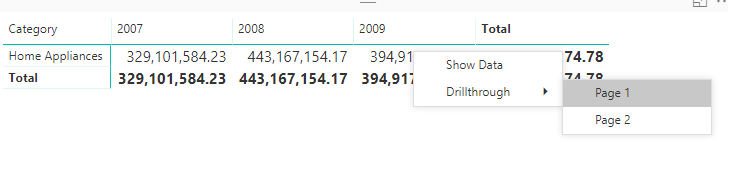
As an option, we could use the Drillthrough feature to get the details information of the value you selected in Matrix. 


Untitled.png


Best regards,

Cherry

Community Support Team _ Cherry Gao
If this post helps, then please consider Accept it as the solution to help the other members find it more quickly.

View solution in original post

3 REPLIES 3
v-piga-msft
Resident Rockstar
Resident Rockstar

Hi @Anonymous,


When using excel pivottable I can double click on each data and get a new tab with detailled information

 I would like to reproduce this behaviour in power Bi using a matrix


It seems that we may impossible to achieve that behaviour in Power BI using a Matrix  currently.


You could post your new idea in Power BI forum and add your comments there to improve Power BI and make this feature coming sooner.


As an option, we could use the Drillthrough feature to get the details information of the value you selected in Matrix. 


Untitled.png


Best regards,

Cherry

Community Support Team _ Cherry Gao
If this post helps, then please consider Accept it as the solution to help the other members find it more quickly.
Anonymous
Not applicable

Hi


Thanks for your reply.


Can I have the same behaviour with something else ? table or anything?


I will use try to implement the drillthrough in my model


Thanks

Hi @Anonymous,


Yes, you could have the same behaviour by Drillthrough with other visuals.


For more about Drillthrough, you could have a look at this article.


Best Regards,

Cherry

Community Support Team _ Cherry Gao
If this post helps, then please consider Accept it as the solution to help the other members find it more quickly.

Helpful resources

Announcements
April Power BI Update Carousel

Power BI Monthly Update - April 2026

Check out the April 2026 Power BI update to learn about new features.

New to Fabric survey Carousel

New to Fabric Survey

If you have recently started exploring Fabric, we'd love to hear how it's going. Your feedback can help with product improvements.

Power BI DataViz World Championships carousel

Power BI DataViz World Championships - June 2026

A new Power BI DataViz World Championship is coming this June! Don't miss out on submitting your entry.

FabCon and SQLCon Highlights Carousel

FabCon &SQLCon Highlights

Experience the highlights from FabCon & SQLCon, available live and on-demand starting April 14th.