Join us at FabCon Atlanta from March 16 - 20, 2026, for the ultimate Fabric, Power BI, AI and SQL community-led event. Save $200 with code FABCOMM.
Register now!Vote for your favorite vizzies from the Power BI Dataviz World Championship submissions. Vote now!
Hello,
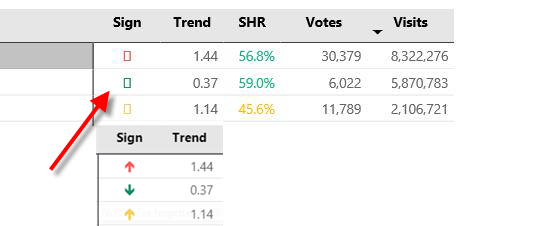
i have a problem with displaying unicode arrows. Namely, when published on PBI Service, I can see the arrows. However, other report users only see empty boxes instead of arrows (when hovered over the arrow shows up). I tried to change DAX code, but the problem still presist.
Do you have any idea how to solve it?
TrendArrow VisitsGlobal = SWITCH ( TRUE() , [Trend Visits Global] > 1 , UNICHAR(129145), [Trend Visits Global] > 0 , UNICHAR(129147), "" )
thanks
Solved! Go to Solution.
this should be helpful
https://docs.microsoft.com/en-us/power-bi/supported-languages-countries-regions#choose-the-locale-fo...
https://docs.microsoft.com/en-us/power-bi/supported-languages-countries-regions#choose-the-language-...
can it be related to the locale? or is it the same for both of you?
Hi @Stachu,
It can be related to locale, because my users are mostly in USA and I am in Europe (Czech Republic).
i am seeing it normaly. but they don't.
What can i do in this case?
this should be helpful
https://docs.microsoft.com/en-us/power-bi/supported-languages-countries-regions#choose-the-locale-fo...
https://docs.microsoft.com/en-us/power-bi/supported-languages-countries-regions#choose-the-language-...
Vote for your favorite vizzies from the Power BI World Championship submissions!
If you love stickers, then you will definitely want to check out our Community Sticker Challenge!
Check out the January 2026 Power BI update to learn about new features.
| User | Count |
|---|---|
| 62 | |
| 53 | |
| 42 | |
| 20 | |
| 17 |
| User | Count |
|---|---|
| 122 | |
| 104 | |
| 45 | |
| 31 | |
| 24 |