Join us at FabCon Atlanta from March 16 - 20, 2026, for the ultimate Fabric, Power BI, AI and SQL community-led event. Save $200 with code FABCOMM.
Register now!The Power BI Data Visualization World Championships is back! Get ahead of the game and start preparing now! Learn more
Hi everyone,
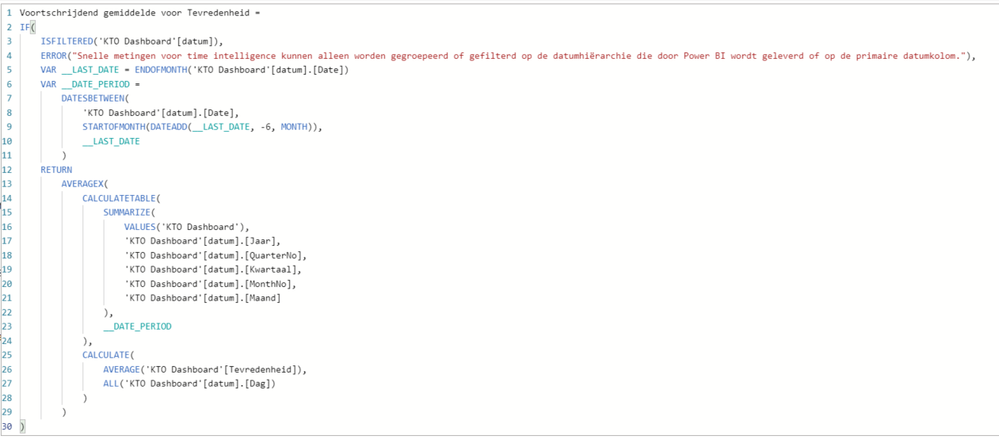
Im trying to make a rolling x-month average for a satisfaction score, but it only works if i use 7months or more. with 6 or less there is no error shown, but the field just stays empty. Anyone an idea how to solve this?
Solved! Go to Solution.
Hi @Anonymous ,
While using a time intelligence function,you'd better first create a date table,then check the vedio below:
https://www.youtube.com/watch?v=HJ95vtzsuIY
Best Regards,
Kelly
Did I answer your question? Mark my post as a solution!
@Anonymous , what is the measure you tried?
Try a measure like the example
Rolling 6 = CALCULATE(Average(Sales[Sales Amount]),DATESINPERIOD('Date'[Date ],MAX('Date'[Date ]),-6,MONTH))
Rolling 6 = CALCULATE(AverageX(values('Date'[Month year]),Sales[Sales Amount]),DATESINPERIOD('Date'[Date ],MAX('Date'[Date ]),-6,MONTH))
I have tried a quick measure time intelligence - rolling average. It does come up with an error around the date hierarchy that I have created; grouping or filtering is only possible on a date hierarchy supplied by powerBI or a primary date column.
Hi @Anonymous ,
While using a time intelligence function,you'd better first create a date table,then check the vedio below:
https://www.youtube.com/watch?v=HJ95vtzsuIY
Best Regards,
Kelly
Did I answer your question? Mark my post as a solution!
sorry half of it is in Dutch...
The Power BI Data Visualization World Championships is back! Get ahead of the game and start preparing now!
Check out the November 2025 Power BI update to learn about new features.
| User | Count |
|---|---|
| 59 | |
| 43 | |
| 42 | |
| 23 | |
| 17 |
| User | Count |
|---|---|
| 190 | |
| 122 | |
| 96 | |
| 66 | |
| 47 |