Join us at FabCon Atlanta from March 16 - 20, 2026, for the ultimate Fabric, Power BI, AI and SQL community-led event. Save $200 with code FABCOMM.
Register now!The Power BI Data Visualization World Championships is back! It's time to submit your entry. Live now!
Hi everyone,
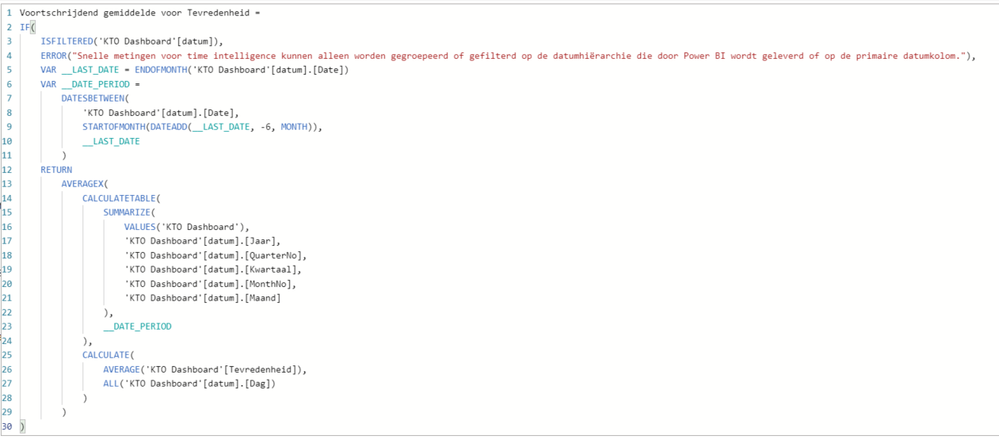
Im trying to make a rolling x-month average for a satisfaction score, but it only works if i use 7months or more. with 6 or less there is no error shown, but the field just stays empty. Anyone an idea how to solve this?
Solved! Go to Solution.
Hi @Anonymous ,
While using a time intelligence function,you'd better first create a date table,then check the vedio below:
https://www.youtube.com/watch?v=HJ95vtzsuIY
Best Regards,
Kelly
Did I answer your question? Mark my post as a solution!
@Anonymous , what is the measure you tried?
Try a measure like the example
Rolling 6 = CALCULATE(Average(Sales[Sales Amount]),DATESINPERIOD('Date'[Date ],MAX('Date'[Date ]),-6,MONTH))
Rolling 6 = CALCULATE(AverageX(values('Date'[Month year]),Sales[Sales Amount]),DATESINPERIOD('Date'[Date ],MAX('Date'[Date ]),-6,MONTH))
I have tried a quick measure time intelligence - rolling average. It does come up with an error around the date hierarchy that I have created; grouping or filtering is only possible on a date hierarchy supplied by powerBI or a primary date column.
Hi @Anonymous ,
While using a time intelligence function,you'd better first create a date table,then check the vedio below:
https://www.youtube.com/watch?v=HJ95vtzsuIY
Best Regards,
Kelly
Did I answer your question? Mark my post as a solution!
sorry half of it is in Dutch...
| User | Count |
|---|---|
| 55 | |
| 39 | |
| 36 | |
| 21 | |
| 19 |
| User | Count |
|---|---|
| 138 | |
| 102 | |
| 59 | |
| 36 | |
| 35 |