Join us at FabCon Atlanta from March 16 - 20, 2026, for the ultimate Fabric, Power BI, AI and SQL community-led event. Save $200 with code FABCOMM.
Register now!View all the Fabric Data Days sessions on demand. View schedule
Hello, I hope you are well
I need to create a measure that allows you to display the maximum value of a column. The funny thing is that this value can vary depending on the filters used.
| category | number | Maximum |
| A | 0,54598347 | 0,94512971 |
| B | 0,02868099 | 0,94512971 |
| C | 0,5445268 | 0,94512971 |
| D | 0,19868194 | 0,94512971 |
| E | 0,09633249 | 0,94512971 |
| F | 0,94512971 | 0,94512971 |
| G | 0,02301643 | 0,94512971 |
| H | 0,61961557 | 0,94512971 |
I've tried MAXA and MAXX and the formula doesn't work for me 😞
Thanks a lot!
Solved! Go to Solution.
Hi @Syndicate_Admin ,
You could use ALL(), ALLSELECTED() and ALLEXCEPT() function to get different result.
ALL() function could be used to calculate the max value for entire table.
https://docs.microsoft.com/en-us/dax/all-function-dax
ALLSELECTED() function could be used to calculate the max value for filtered table.
https://docs.microsoft.com/en-us/dax/allselected-function-dax
ALLEXCEPT() function could be used to calculated the max value for groups.
https://docs.microsoft.com/en-us/dax/allselected-function-dax
Best Regards,
Jay
Hi @Syndicate_Admin ,
You could use ALL(), ALLSELECTED() and ALLEXCEPT() function to get different result.
ALL() function could be used to calculate the max value for entire table.
https://docs.microsoft.com/en-us/dax/all-function-dax
ALLSELECTED() function could be used to calculate the max value for filtered table.
https://docs.microsoft.com/en-us/dax/allselected-function-dax
ALLEXCEPT() function could be used to calculated the max value for groups.
https://docs.microsoft.com/en-us/dax/allselected-function-dax
Best Regards,
Jay
Hi @Syndicate_Admin ,
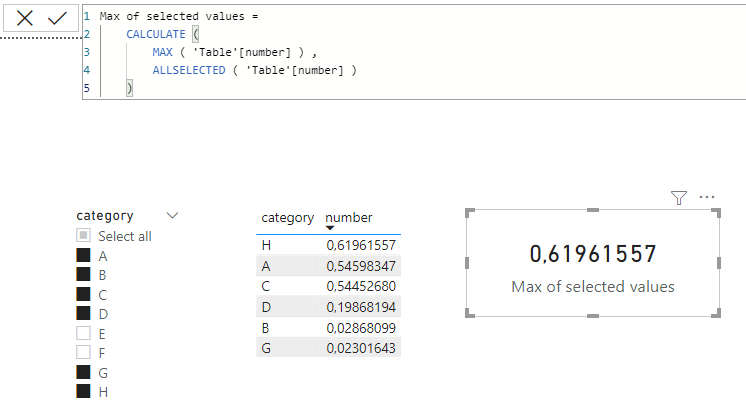
you can do it like this:
Max of selected values =
CALCULATE (
MAX ( 'Table'[number] ) ,
ALLSELECTED ( 'Table'[number] )
)
With kind regards from the town where the legend of the 'Pied Piper of Hamelin' is at home
FrankAT (Proud to be a Datanaut)
Check out the November 2025 Power BI update to learn about new features.
Advance your Data & AI career with 50 days of live learning, contests, hands-on challenges, study groups & certifications and more!