Join us in Barcelona for FabCon and SQLCon, September 28 - October 1, 2026.
This is best Fabric, Power BI, SQL and AI community event. How do we know? The last event sold out! Save €200 with code FABCMTY200.
Register now- Power BI forums
- Get Help with Power BI
- Desktop
- Service
- Report Server
- Power Query
- Mobile Apps
- Developer
- DAX Commands and Tips
- Custom Visuals Development Discussion
- Health and Life Sciences
- Power BI Spanish forums
- Translated Spanish Desktop
- Training and Consulting
- Instructor Led Training
- Dashboard in a Day for Women, by Women
- Galleries
- Data Stories Gallery
- Themes Gallery
- Contests Gallery
- QuickViz Gallery
- Quick Measures Gallery
- Visual Calculations Gallery
- Fabric Apps Gallery
- Notebook Gallery
- Translytical Task Flow Gallery
- TMDL Gallery
- R Script Showcase
- Webinars and Video Gallery
- Ideas
- Custom Visuals Ideas (read-only)
- Issues
- Issues
- Events
- Upcoming Events
July 28 - August 9 | Final Round of the Power BI Dataviz World Championships. This is your chance. Learn more
- Power BI forums
- Forums
- Get Help with Power BI
- Desktop
- Re: undefined
- Subscribe to RSS Feed
- Mark Topic as New
- Mark Topic as Read
- Float this Topic for Current User
- Bookmark
- Subscribe
- Printer Friendly Page


- Mark as New
- Bookmark
- Subscribe
- Mute
- Subscribe to RSS Feed
- Permalink
- Report Inappropriate Content
undefined
I have three different KPI's for each of the Priority levels. How can I set different conditional formatting for the results in a table. See screen shots below. This is how I would like it to show -
Minor - Show RED font if greater than 170, Green otherwise
Major - Show RED font if greater than 72, Green otherwise
Critical - Show RED font if 24 greater than 24, green otherwise

Solved! Go to Solution.


- Mark as New
- Bookmark
- Subscribe
- Mute
- Subscribe to RSS Feed
- Permalink
- Report Inappropriate Content
Hi @jcastr02 ,
Please change your condition measure like so:
Condition =
IF (
    MAX ( 'Table (3)'[Priority] ) = "Minor",
    IF ( AVERAGE ( 'Table (3)'[Value] ) > 170, 1, 0 ),
    IF (
        MAX ( 'Table (3)'[Priority] ) = "Major",
        IF ( AVERAGE ( 'Table (3)'[Value] ) > 72, 1, 0 ),
        IF (
            MAX ( 'Table (3)'[Priority] ) = "Critical",
            IF ( AVERAGE ( 'Table (3)'[Value] ) > 24, 1, 0 )
        )
    )
)
This is because of your "average" value in matrix.
Best Regards,
Icey
If this post helps, then please consider Accept it as the solution to help the other members find it more quickly.
- Mark as New
- Bookmark
- Subscribe
- Mute
- Subscribe to RSS Feed
- Permalink
- Report Inappropriate Content
Hi @jcastr02 ,
Is this problem sloved?
If it is sloved, please always accept the replies making sense as solution to your question so that people who may have the same question can get the solution directly.
If not, please let me know.
Best Regards
Icey
- Mark as New
- Bookmark
- Subscribe
- Mute
- Subscribe to RSS Feed
- Permalink
- Report Inappropriate Content
Hi @jcastr02 ,
You can create a measure like so:
Condition =
IF (
    MAX ( 'Table (3)'[Priority] ) = "Minor",
    IF ( MAX ( 'Table (3)'[Value] ) > 170, 1, 0 ),
    IF (
        MAX ( 'Table (3)'[Priority] ) = "Major",
        IF ( MAX ( 'Table (3)'[Value] ) > 72, 1, 0 ),
        IF (
            MAX ( 'Table (3)'[Priority] ) = "Critical",
            IF ( MAX ( 'Table (3)'[Value] ) > 24, 1, 0 )
        )
    )
)
And then, set conditional formatting.
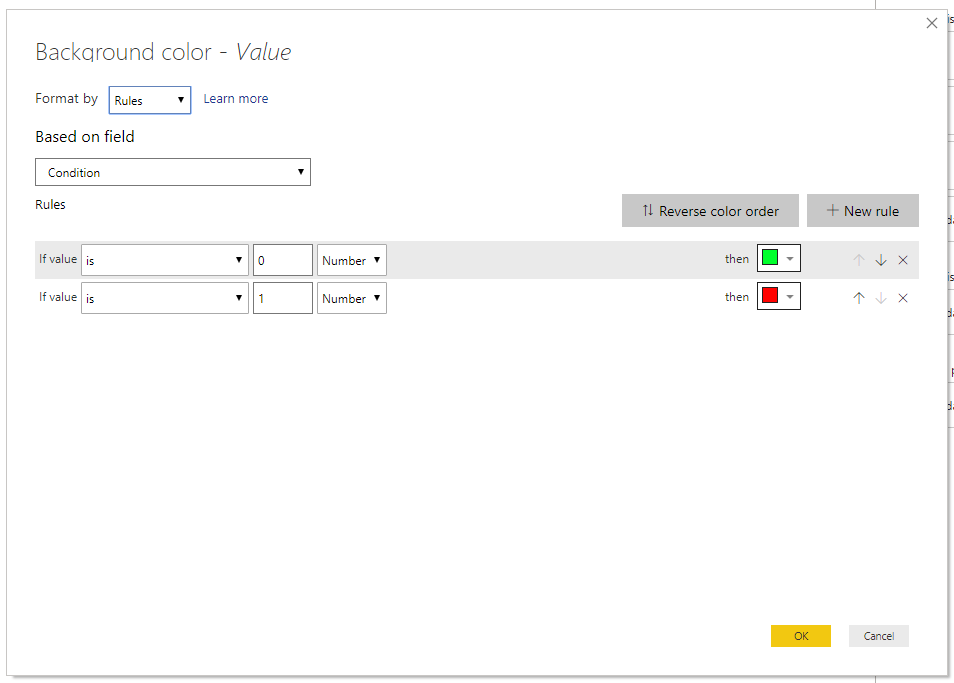

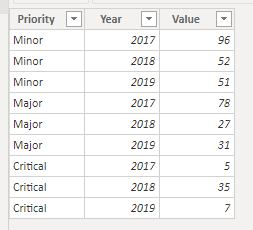
Best Regards,
Icey
If this post helps, then please consider Accept it as the solution to help the other members find it more quickly.
- Mark as New
- Bookmark
- Subscribe
- Mute
- Subscribe to RSS Feed
- Permalink
- Report Inappropriate Content
hello @Icey
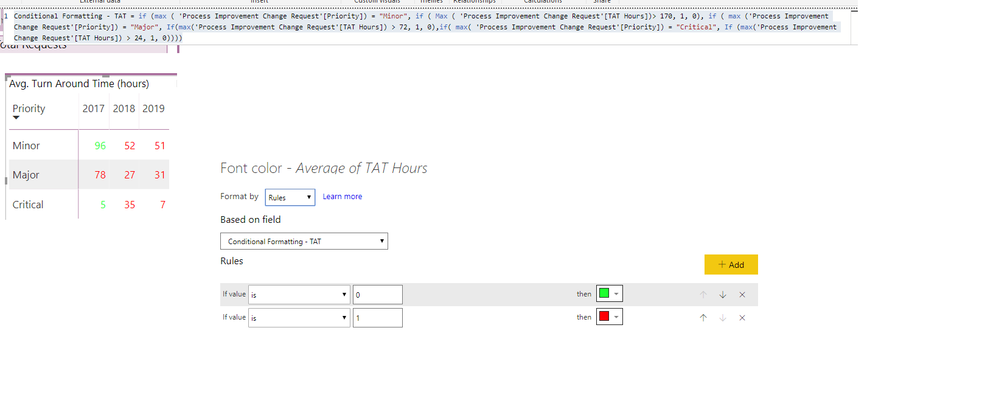
I added the measure and the conditional formatting. One thing I notice is that I don't have the number field in the conditional formatting area. Any ideas? See screen shot below **I ended up using the font color vs. background color, assumming this is the same process anyways**
- Mark as New
- Bookmark
- Subscribe
- Mute
- Subscribe to RSS Feed
- Permalink
- Report Inappropriate Content
- Mark as New
- Bookmark
- Subscribe
- Mute
- Subscribe to RSS Feed
- Permalink
- Report Inappropriate Content
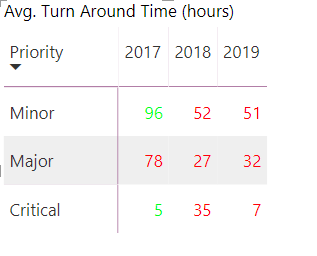
@Icey hello, I've downloaded the latest version, but the colors are still showing off.
Here is my DAX:
- Mark as New
- Bookmark
- Subscribe
- Mute
- Subscribe to RSS Feed
- Permalink
- Report Inappropriate Content
Hi @jcastr02 ,
That is so strange. If you don't mind, please share your PBIX with me.
Best Regards
Icey
- Mark as New
- Bookmark
- Subscribe
- Mute
- Subscribe to RSS Feed
- Permalink
- Report Inappropriate Content
- Mark as New
- Bookmark
- Subscribe
- Mute
- Subscribe to RSS Feed
- Permalink
- Report Inappropriate Content
- Mark as New
- Bookmark
- Subscribe
- Mute
- Subscribe to RSS Feed
- Permalink
- Report Inappropriate Content
if not I can attach more screen shots
- Mark as New
- Bookmark
- Subscribe
- Mute
- Subscribe to RSS Feed
- Permalink
- Report Inappropriate Content
- Mark as New
- Bookmark
- Subscribe
- Mute
- Subscribe to RSS Feed
- Permalink
- Report Inappropriate Content
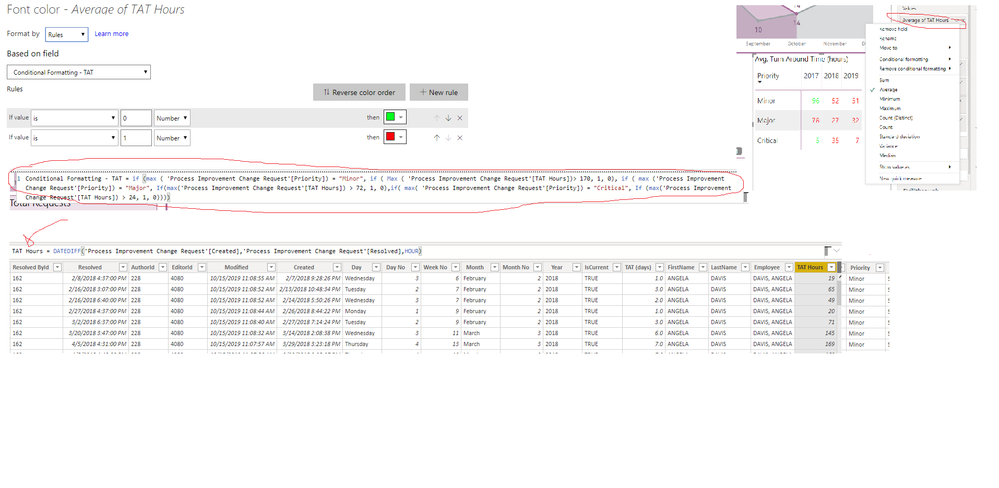
Sorry it looks like it wont let me share, attached is screen shot where I show average of the turn around time, and the rules set , along with DAX. @Icey
- Mark as New
- Bookmark
- Subscribe
- Mute
- Subscribe to RSS Feed
- Permalink
- Report Inappropriate Content
Hi @jcastr02 ,
Please change your condition measure like so:
Condition =
IF (
    MAX ( 'Table (3)'[Priority] ) = "Minor",
    IF ( AVERAGE ( 'Table (3)'[Value] ) > 170, 1, 0 ),
    IF (
        MAX ( 'Table (3)'[Priority] ) = "Major",
        IF ( AVERAGE ( 'Table (3)'[Value] ) > 72, 1, 0 ),
        IF (
            MAX ( 'Table (3)'[Priority] ) = "Critical",
            IF ( AVERAGE ( 'Table (3)'[Value] ) > 24, 1, 0 )
        )
    )
)
This is because of your "average" value in matrix.
Best Regards,
Icey
If this post helps, then please consider Accept it as the solution to help the other members find it more quickly.
- Mark as New
- Bookmark
- Subscribe
- Mute
- Subscribe to RSS Feed
- Permalink
- Report Inappropriate Content


- Mark as New
- Bookmark
- Subscribe
- Mute
- Subscribe to RSS Feed
- Permalink
- Report Inappropriate Content

Helpful resources

FabCon & SQLCon – Barcelona 2026
Join us in Barcelona for FabCon and SQLCon, the Fabric, Power BI, SQL, and AI community event. Save €200 with code FABCMTY200.

Fabric Community Sticker Challenge - Barcelona 2026
If you love stickers, then you will definitely want to check out our community sticker challenge, Barcelona edition!

Power BI Monthly Update - July 2026
Check out the July 2026 Power BI update to learn about new features.

Power BI DataViz World Championships - June 2026
A new Power BI DataViz World Championship is coming this June! Don't miss out on submitting your entry.

| User | Count |
|---|---|
| 25 | |
| 23 | |
| 19 | |
| 17 | |
| 14 |


| User | Count |
|---|---|
| 25 | |
| 23 | |
| 20 | |
| 20 | |
| 19 |


