Join us at FabCon Atlanta from March 16 - 20, 2026, for the ultimate Fabric, Power BI, AI and SQL community-led event. Save $200 with code FABCOMM.
Register now!The Power BI Data Visualization World Championships is back! Get ahead of the game and start preparing now! Learn more
I have 3 goals...each goal has versions. I have easily listed each goal in a Table that shows each version. What i would like is to have a different grouping:
Current State:
Goal 1 Version Goal 2 Version Goal 3 Version
g1v1 1 g2v1 1 g3v1 1
g1v2 2 g2v2 2 g3v2 2
g1v3 3 g3v3 3 g3v3 3
Where each goal is a separate table
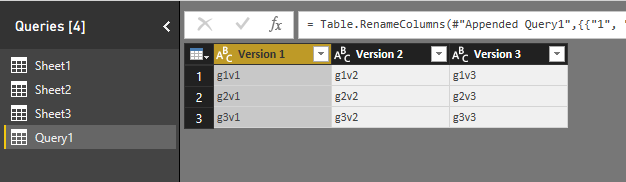
What i want is:
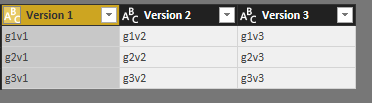
Version 1 Version 2 Version 3
G1v1 g1v2 G1v3
g2v1 g2v2 g2v3
g3v1 g3v2 g3v3
I also need this to be in a chart so i can use conditional formatting.
Any help is appreciated.
Solved! Go to Solution.
Hi @jlynch
Please refer to the modified file
let
Source1 = Table.SelectColumns(Sheet4,{"Goal 1","Version1"}),
#"Pivoted Column1" = Table.Pivot(Table.TransformColumnTypes(Source1, {{"Version1", type text}}, "en-US"), List.Distinct(Table.TransformColumnTypes(Source1, {{"Version1", type text}}, "en-US")[Version1]), "Version1", "Goal 1"),
Source2 = Table.SelectColumns(Sheet4,{"Goal 2","Version2"}),
#"Pivoted Column2" = Table.Pivot(Table.TransformColumnTypes(Source2, {{"Version2", type text}}, "en-US"), List.Distinct(Table.TransformColumnTypes(Source2, {{"Version2", type text}}, "en-US")[Version2]), "Version2", "Goal 2"),
Source3 = Table.SelectColumns(Sheet4,{"Goal 3","Version3"}),
#"Pivoted Column3" = Table.Pivot(Table.TransformColumnTypes(Source3, {{"Version3", type text}}, "en-US"), List.Distinct(Table.TransformColumnTypes(Source3, {{"Version3", type text}}, "en-US")[Version3]), "Version3", "Goal 3"),
#"Appended Query1"= Table.Combine({#"Pivoted Column1", #"Pivoted Column2", #"Pivoted Column3" }),
#"Renamed Columns" = Table.RenameColumns(#"Appended Query1",{{"1", "Version 1"}, {"2", "Version 2"}, {"3", "Version 3"}})
in
#"Renamed Columns"
Best Regards
Maggie
Hi @jlynch
In Query Editor
Create a blank query, code in Advanced editor
let
Source1 = Sheet1,
#"Pivoted Column1" = Table.Pivot(Table.TransformColumnTypes(Source1, {{"Version", type text}}, "en-US"), List.Distinct(Table.TransformColumnTypes(Source1, {{"Version", type text}}, "en-US")[Version]), "Version", "Goal 1"),
Source2 = Sheet2,
#"Pivoted Column2" = Table.Pivot(Table.TransformColumnTypes(Source2, {{"Version", type text}}, "en-US"), List.Distinct(Table.TransformColumnTypes(Source2, {{"Version", type text}}, "en-US")[Version]), "Version", "Goal 2"),
Source3 = Sheet3,
#"Pivoted Column3" = Table.Pivot(Table.TransformColumnTypes(Source3, {{"Version", type text}}, "en-US"), List.Distinct(Table.TransformColumnTypes(Source3, {{"Version", type text}}, "en-US")[Version]), "Version", "Goal 3"),
#"Appended Query1"= Table.Combine({#"Pivoted Column1", #"Pivoted Column2", #"Pivoted Column3" }),
#"Renamed Columns" = Table.RenameColumns(#"Appended Query1",{{"1", "Version 1"}, {"2", "Version 2"}, {"3", "Version 3"}})
in
#"Renamed Columns"
Best Regards
Maggie
this is awesome but one point I'd like to clarify, goal 1,2 and 3 are all in the same table as well as the version. so would I use that table as sheet1,2 and 3 and keep the different sources?
The way i built the data, there is a new version when any one of the goals change so there is 1 version per set of goals, and it's all in one table.
Just making sure I understand the syntax here.
Hi @jlynch
Please refer to the modified file
let
Source1 = Table.SelectColumns(Sheet4,{"Goal 1","Version1"}),
#"Pivoted Column1" = Table.Pivot(Table.TransformColumnTypes(Source1, {{"Version1", type text}}, "en-US"), List.Distinct(Table.TransformColumnTypes(Source1, {{"Version1", type text}}, "en-US")[Version1]), "Version1", "Goal 1"),
Source2 = Table.SelectColumns(Sheet4,{"Goal 2","Version2"}),
#"Pivoted Column2" = Table.Pivot(Table.TransformColumnTypes(Source2, {{"Version2", type text}}, "en-US"), List.Distinct(Table.TransformColumnTypes(Source2, {{"Version2", type text}}, "en-US")[Version2]), "Version2", "Goal 2"),
Source3 = Table.SelectColumns(Sheet4,{"Goal 3","Version3"}),
#"Pivoted Column3" = Table.Pivot(Table.TransformColumnTypes(Source3, {{"Version3", type text}}, "en-US"), List.Distinct(Table.TransformColumnTypes(Source3, {{"Version3", type text}}, "en-US")[Version3]), "Version3", "Goal 3"),
#"Appended Query1"= Table.Combine({#"Pivoted Column1", #"Pivoted Column2", #"Pivoted Column3" }),
#"Renamed Columns" = Table.RenameColumns(#"Appended Query1",{{"1", "Version 1"}, {"2", "Version 2"}, {"3", "Version 3"}})
in
#"Renamed Columns"
Best Regards
Maggie
does it matter if in table4 - Version1, version2 and Version3 are actually the same column? I assume I can just use that one variable in place of the 3 and therefor thank you for your solution.
The Power BI Data Visualization World Championships is back! Get ahead of the game and start preparing now!
| User | Count |
|---|---|
| 39 | |
| 37 | |
| 33 | |
| 32 | |
| 29 |
| User | Count |
|---|---|
| 132 | |
| 86 | |
| 85 | |
| 68 | |
| 64 |