Join us at FabCon Atlanta from March 16 - 20, 2026, for the ultimate Fabric, Power BI, AI and SQL community-led event. Save $200 with code FABCOMM.
Register now!The Power BI Data Visualization World Championships is back! It's time to submit your entry. Live now!
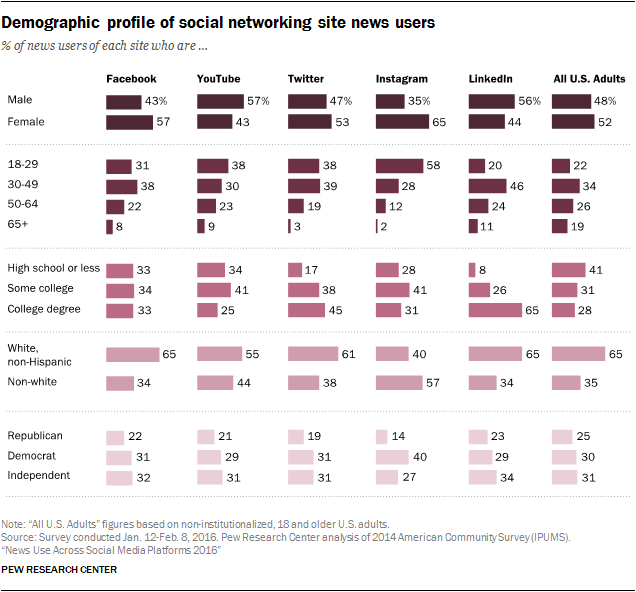
how to create report like this??Please i need help.
Solved! Go to Solution.
Hi @Prajwalkumari,
You can try to create matrix preview visual with the data bar feature to achieve your requirement:
Reference link:
Power BI Desktop June Feature Summary
Notice: current data bar conditional formatting only available on table preview and matrix preview. If you can't find these preview visuals, you should turn on them at 'Option' -> 'Preview Features'
Regards,
Xiaoxin Sheng
Hi @Prajwalkumari,
You can try to create matrix preview visual with the data bar feature to achieve your requirement:
Reference link:
Power BI Desktop June Feature Summary
Notice: current data bar conditional formatting only available on table preview and matrix preview. If you can't find these preview visuals, you should turn on them at 'Option' -> 'Preview Features'
Regards,
Xiaoxin Sheng
The Power BI Data Visualization World Championships is back! It's time to submit your entry.
Check out the January 2026 Power BI update to learn about new features.
| User | Count |
|---|---|
| 69 | |
| 45 | |
| 36 | |
| 28 | |
| 23 |
| User | Count |
|---|---|
| 135 | |
| 121 | |
| 58 | |
| 40 | |
| 32 |