cancel
Showing results for 
Search instead for 
Did you mean: 

The Power BI Data Visualization World Championships is back! It's time to submit your entry. Live now!

Reply
akwang
Advocate II
Advocate II

tachometer

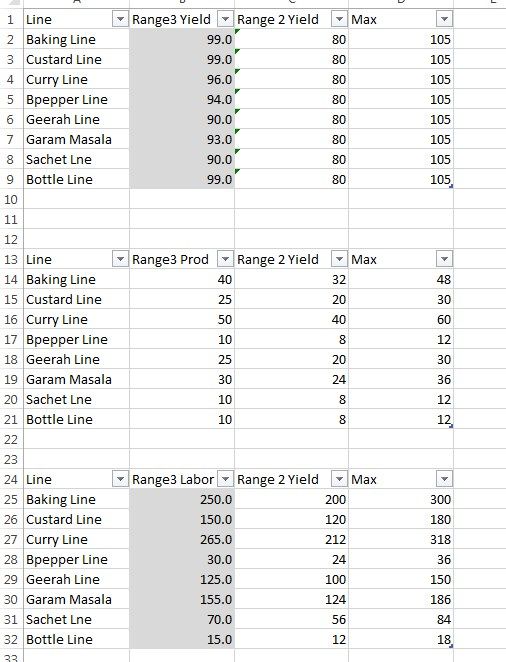
I am having difficulty with the tachometer. Since the Dial is not available anymore. I have 3 tables with the range for the meter as shown below that corresponds to 3 meters:


Screenshot_1.jpg 


And I have a master table that gives it the value. I have a filter for each Line, and the idea is that as I select the line the 3 meter adjust accordingly. The needle is working okay for the meter, but the color ranges don’t adjust to the Line, instead it remains constant. Hope you can help.

1 ACCEPTED SOLUTION
v-sihou-msft
Microsoft Employee
Microsoft Employee

@akwang


As you said Dial Guage is not available, and you also need to filter the data on Line level, I suggest you use a Bullet Chart to achieve your goal. You will need Max, Min, Good, Satisfield coluns in your tables so that you can specify range for different colors. 


Regards,

View solution in original post

1 REPLY 1
v-sihou-msft
Microsoft Employee
Microsoft Employee

@akwang


As you said Dial Guage is not available, and you also need to filter the data on Line level, I suggest you use a Bullet Chart to achieve your goal. You will need Max, Min, Good, Satisfield coluns in your tables so that you can specify range for different colors. 


Regards,

Helpful resources

Announcements
Power BI DataViz World Championships

Power BI Dataviz World Championships

The Power BI Data Visualization World Championships is back! It's time to submit your entry.

January Power BI Update Carousel

Power BI Monthly Update - January 2026

Check out the January 2026 Power BI update to learn about new features.

FabCon Atlanta 2026 carousel

FabCon Atlanta 2026

Join us at FabCon Atlanta, March 16-20, for the ultimate Fabric, Power BI, AI and SQL community-led event. Save $200 with code FABCOMM.