Join us at FabCon Atlanta from March 16 - 20, 2026, for the ultimate Fabric, Power BI, AI and SQL community-led event. Save $200 with code FABCOMM.
Register now!The Power BI Data Visualization World Championships is back! Get ahead of the game and start preparing now! Learn more
Hi,
In the first table we have all dates in a year
In the second table we have a unique list of employees
Now we need a table that shows for each day and employee a record
With kind regards
2018-01-01
2018-01-02
etc
Thomas
Eric
etc
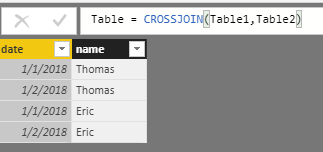
The result must be:
2018-01-01 Thomas
2018-01-02 Thomas
2018-01-01 Eric
2018-01-02 Eric
Solved! Go to Solution.
Hi @Anonymous
Modeling->New Table
enter the formula
Table = CROSSJOIN(Table1,Table2)
Best Regards
Maggie
Hi @Anonymous
Modeling->New Table
enter the formula
Table = CROSSJOIN(Table1,Table2)
Best Regards
Maggie
The Power BI Data Visualization World Championships is back! Get ahead of the game and start preparing now!
| User | Count |
|---|---|
| 63 | |
| 55 | |
| 42 | |
| 41 | |
| 23 |
| User | Count |
|---|---|
| 166 | |
| 135 | |
| 120 | |
| 79 | |
| 53 |