This time we’re going bigger than ever. Fabric, Power BI, SQL, AI and more. We're covering it all. You won't want to miss it.
Learn moreDid you hear? There's a new SQL AI Developer certification (DP-800). Start preparing now and be one of the first to get certified. Register now
Dear Team,
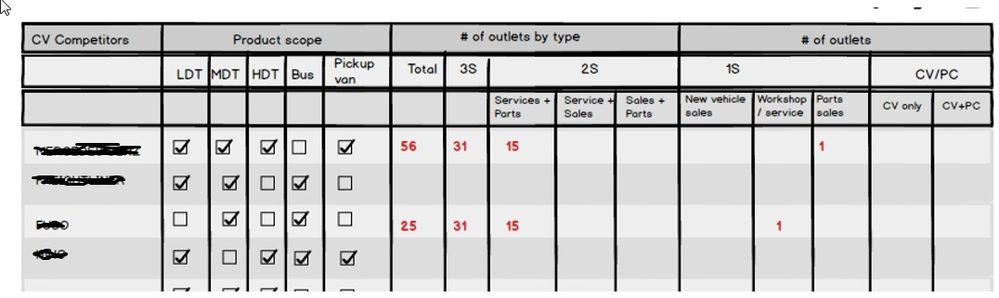
Im trying to create report with table format.But in table columns having some parent headers (kind of grouping) as below.
Could you please suggest. Please suggest some workaround if there is no direct option.
Thank you,
Regards,
Karthik.K
Hi @karthiknpm,
In Power BI, it is not possible to add group headers.
As a workaround, you could unpivot table structure first in Query Editor mode. Then, add a calculated column to group original field names (which are listed in a new single column). Then, use a Matrix visual to display data.
Regards,
Yuliana Gu
Hi,
Thank for the response.
Currently I didnt pivoted the columns. all are columns in a table.for designing purpose I had grouped the columns.
Enclosed the screenshot of table structure.
Could you please provide a sample.
Note: Is there any option to remove column headers in table (not by changing background colour to same colour). By only view the rows .
Regards,
Karthik.K
Check out the April 2026 Power BI update to learn about new features.
Sign up to receive a private message when registration opens and key events begin.
If you have recently started exploring Fabric, we'd love to hear how it's going. Your feedback can help with product improvements.
| User | Count |
|---|---|
| 35 | |
| 32 | |
| 25 | |
| 23 | |
| 16 |
| User | Count |
|---|---|
| 65 | |
| 50 | |
| 30 | |
| 23 | |
| 23 |