Join us at FabCon Atlanta from March 16 - 20, 2026, for the ultimate Fabric, Power BI, AI and SQL community-led event. Save $200 with code FABCOMM.
Register now!The Power BI Data Visualization World Championships is back! It's time to submit your entry. Live now!
Hi all,
I have an issue with below.
I want to transfom my current data table to the desired data table.
Can somebody help me out?
Thanks!
John
Current data
| carrier_product_group | section | product_sub_group | partnumber_sup | order_amount | points_audit |
| Repaired Eletronics | 3.c | ML3 repaired microprocessor | 1256008 | 2 | 2 |
| Repaired Eletronics | 3.c | ML3 repaired microprocessor | 1256011 | 4 | 2 |
| Repaired Eletronics | 3.c | ML3 repaired microprocessor | 1256012 | 2 | 2 |
Desired data
| carrier_product_group | section | product_sub_group | average_points_audit |
| Repaired Eletronics | 3.c | ML3 repaired microprocessor | 2 |
Solved! Go to Solution.
Hi @Anonymous
just put columns
| carrier_product_group | section | product_sub_group |
on your vusiaul table.
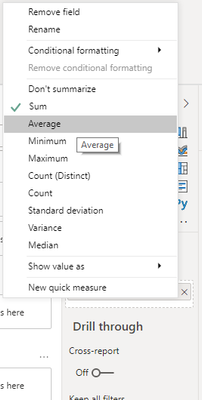
then put column points_audit and set aggregation as Average in Visualization pane
Hi @Anonymous ,
Or create a calculated table.
Desired data =
SUMMARIZE(
'Current data',
'Current data'[carrier_product_group],
'Current data'[section],
'Current data'[product_sub_group],
"average_points_audit", AVERAGE('Current data'[points_audit])
)
Best regards,
Lionel Chen
If this post helps, then please consider Accept it as the solution to help the other members find it more quickly.
Hi @Anonymous ,
Or create a calculated table.
Desired data =
SUMMARIZE(
'Current data',
'Current data'[carrier_product_group],
'Current data'[section],
'Current data'[product_sub_group],
"average_points_audit", AVERAGE('Current data'[points_audit])
)
Best regards,
Lionel Chen
If this post helps, then please consider Accept it as the solution to help the other members find it more quickly.
Hi @Anonymous
just put columns
| carrier_product_group | section | product_sub_group |
on your vusiaul table.
then put column points_audit and set aggregation as Average in Visualization pane
The Power BI Data Visualization World Championships is back! It's time to submit your entry.
Check out the January 2026 Power BI update to learn about new features.
| User | Count |
|---|---|
| 60 | |
| 46 | |
| 39 | |
| 23 | |
| 23 |
| User | Count |
|---|---|
| 144 | |
| 106 | |
| 63 | |
| 38 | |
| 31 |